Updated
AI ERP: native or added on? Five tests that show the difference
An AI ERP is a business system in which artificial intelligence does part of the actual work: reading documents, matching transactions, proposing bookings and answering questions on live data. Almost every vendor now uses the label. Whether the AI was built into the system's foundations or added to an older product shows up in five tests: the data model, where the AI acts, how approval works, what the audit trail records and how fast the system is configured.
The feature lists look the same because they are written for the same buyers. The differences only appear when you watch the system work on real transactions. This article sets out those tests so a finance team can run them in a demo, without needing to judge the vendor's architecture diagrams.
Why has "AI ERP" stopped meaning anything?
Two kinds of product are sold under the same name. The first is an established ERP, often designed fifteen or twenty years ago around forms, modules and batch jobs, to which a chat assistant, invoice reading or forecasting features have been added. The second is a system designed from the start on the assumption that AI will do much of the routine work and people will review it.
Both are legitimate. Both will show a chat window in the demo, both will read an invoice. The difference is underneath: whether the AI sees the whole business or one module, whether it can act or only comment, and whether its actions fit the controls a finance team needs. Our guide to what an AI-native ERP is covers the definition. Here the focus is on how to tell them apart in practice.
What are the five tests?
Each test is a question you can ask in a demo, followed by something you ask to see.
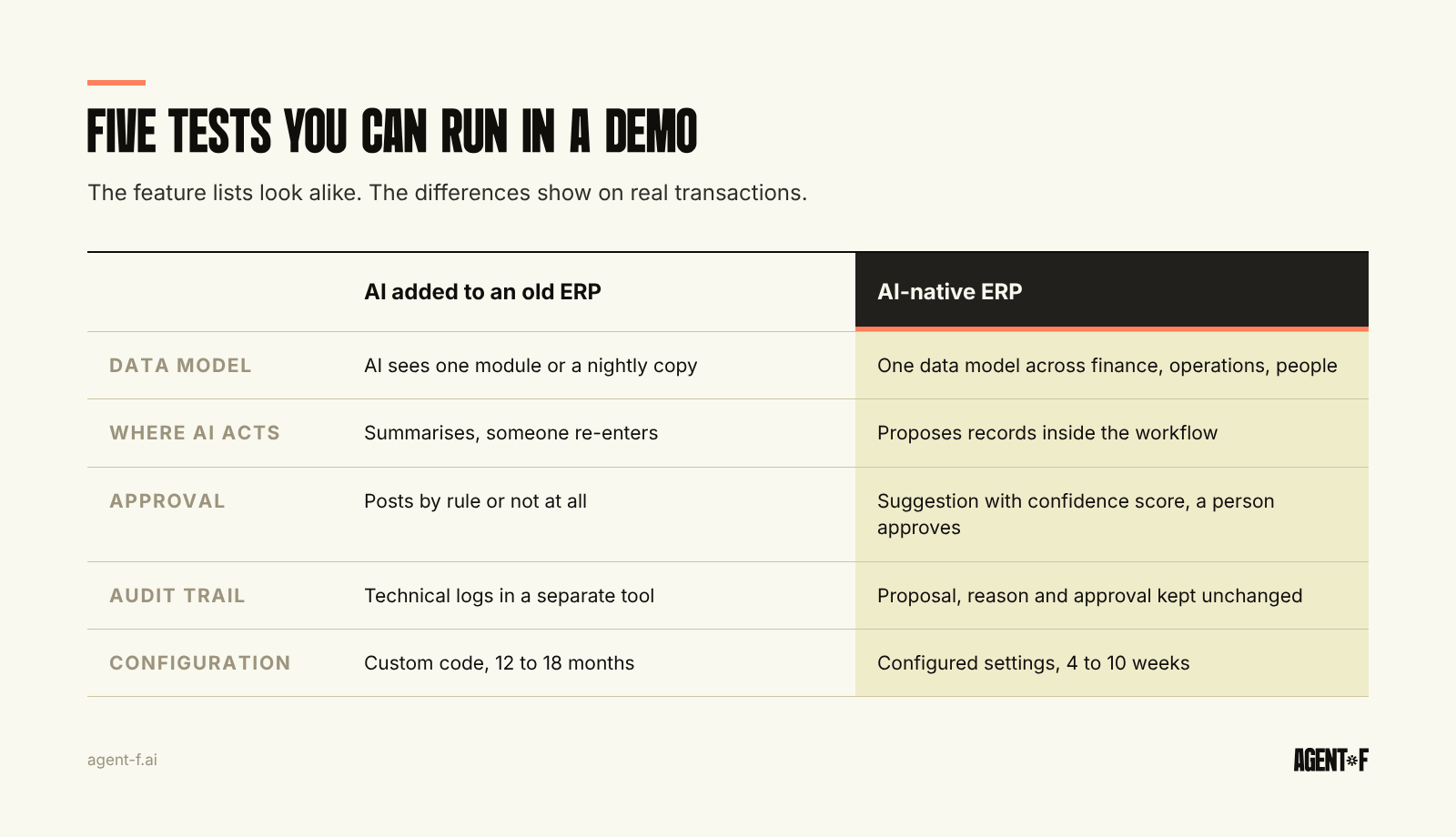
- The data model. Does the AI work on one data model that covers finance, operations and people, or on copies synchronised between modules and tools?
- Where the AI acts. Does it change records inside the workflow, or does it sit beside the workflow and describe what it sees?
- Approval. Is every AI action a suggestion that a named person approves, with a confidence score, or does it post on its own?
- The audit trail. Can you see, for one booking, what the AI proposed, why, who approved it and when, unchanged?
- Configuration speed. How long does it take to set the system up for your company, and who does it?
The sections below explain what a good answer looks like and why each test matters.
How do you test the data model and where the AI acts?
Ask a question that crosses module boundaries. For example: which customer orders from last quarter have been delivered but not yet invoiced, and what does that do to this month's revenue? In a system with one data model, the answer comes from the same records that the warehouse, sales and accounting use. In a system built from modules, the AI often sees only the module it was added to, or a nightly copy, and the answer is either partial or out of date.
Then ask the AI to do something, not only explain something. Ask it to match a set of bank transactions to open invoices, or to draft the accruals for missing supplier invoices. If the result is a summary that someone then has to enter by hand, the AI is a commentator. If the result is a set of proposed records in the workflow, ready for approval, the AI is part of the process. A third check belongs here too. Ask where the AI's suggestions come from. Generic rules supplied by the vendor work for common cases. Suggestions learned from your own booking history, your cost centres and your suppliers fit the way your company actually works, and they are easier to explain to a tax advisor. The difference between an assistant that comments and an agent that acts is the subject of agentic ERP.
How do you test approval and the audit trail?
These two tests matter most in Germany, because the German digital bookkeeping rules (GoBD) expect controls on input and processing that are logged, and a procedure documentation (Verfahrensdokumentation) that explains how automated bookings come about. An AI that books without a trace makes both harder.
Ask the vendor to show one AI-proposed booking from start to finish. A good answer shows the proposal, the confidence score, the reason (for example, the earlier bookings it learned from), the person who approved it, the time of approval and the fact that none of this can be changed afterwards. Then ask what happens to low-confidence suggestions. They should go to a person for review, not into the ledger by default.
Finally, ask what the system does when the AI is wrong. Someone rejects or corrects a suggestion: does the system learn from that correction for the next similar transaction, and is the correction itself recorded? A system that learns from your approvals gets more useful each month. One that repeats the same mistake turns the approval step into a permanent manual job, which is the work the AI was supposed to remove.
If the AI's actions are logged in a separate tool, or only as technical system logs, the audit trail exists but nobody in finance or the tax advisor's office (Steuerberater) can read it.
Why does configuration speed say so much about the architecture?
A system that needs twelve to eighteen months of implementation has usually been adapted to the customer through custom code, extra modules and workarounds. Every one of these is a place where the AI has to be taught separately, or cannot reach at all. Over time they become what we call ERP complexity debt.
A system designed around one data model can be configured rather than customised. The chart of accounts, approval rules, cost centres and entities are settings, not projects. Ask the vendor how long a company of your size usually takes to go live, what is configured and what is programmed, and whether you can run the new system in parallel to the old one before switching. A realistic implementation plan, module by module, is described in ERP implementation without stalling.
How does Agent F answer the five tests?
- Data model: finance, operations and people share one data model, so there is nothing to sync between modules.
- Where the AI acts: inside the workflow, on the invoices, payments and bookings themselves.
- Approval: every AI action is a suggestion with a confidence score, and a person approves it.
- Audit trail: suggestions and approvals sit in one immutable audit trail, and the same records feed the DATEV export your tax advisor (Steuerberater) works from.
- Configuration speed: implementation typically takes 4 to 10 weeks, compared with 12 to 18 months for legacy ERP.
What should you do with these tests?
Take the five questions into your next two or three vendor demos, and ask each vendor to answer them on the same sample: a handful of real supplier invoices, a bank statement and one cross-module question. Score the answers side by side, the way the ERP selection criteria scorecard does. Ask your tax advisor to look at one audit trail entry from each system. The test results will tell you more than the feature list, and they need no more than a sample of your own documents.
Learn how Agent F works, or see it on your own data at agent-f.ai/demo.
This article is for general information only and does not constitute tax or legal advice. Parts of it were generated with AI. Please consult your tax advisor or legal counsel before acting on it, and feel free to reach out at team@agent-f.com with any questions or for support.