Updated
Bank connectivity for your ERP: PSD2, EBICS and payments from one system
A bank ERP integration connects your accounts to the system that holds your invoices, so statements arrive automatically and payments leave without manual uploads. In Germany, it runs on two channels: PSD2 interfaces, which every bank must offer for reading accounts, and EBICS, the corporate banking standard for sending payment files and retrieving statements. Most growing companies end up needing both.
The connection itself is rarely the hard part. The hard part is the loop: a payment prepared from an approved invoice, signed at the bank, confirmed back, and matched to the invoice it paid. This guide explains the two channels, what each can and cannot do, and how to close that loop in one system.
What does a bank connection actually need to do?
A bank connection has four jobs, and most setups only do the first one well:
- Read balances and transactions, ideally daily or intraday, for every account.
- Send payments, usually as a batch of supplier transfers or salary payments.
- Return the status of each payment: accepted, rejected, executed.
- Deliver statements in a structured format that software can match without guessing.
A bank feed that only covers the first job gives you a current balance but leaves payments in online banking. Then someone exports a file from the ERP, uploads it in the bank portal, signs it on a phone and later ticks the invoices off by hand. That is three systems for one payment.
Which bank channel should you use: PSD2 or EBICS?
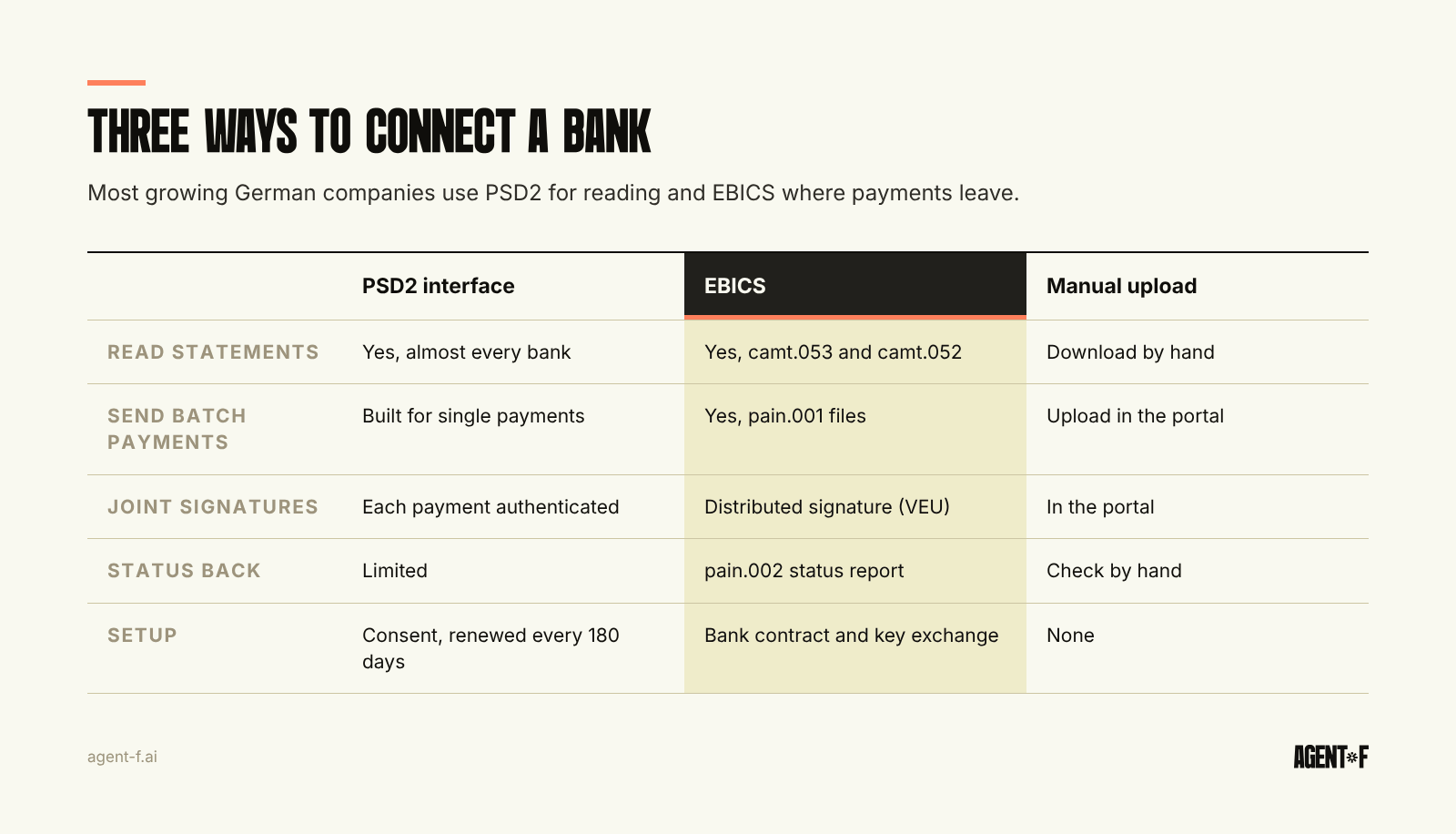
PSD2 is the EU's second payment services directive, applicable since January 2018. It requires banks to give licensed providers access to payment accounts with the account holder's consent. For reading accounts this works well and covers almost every bank, including digital banks. Two limits matter in practice. Consent has to be renewed with strong customer authentication periodically, since 2023 every 180 days instead of the original 90, as we describe in cash management across banks. And payment initiation through PSD2 is designed around single payments, with the payer authenticating each one, which fits a customer checkout better than a weekly run of 40 supplier transfers.
EBICS (Electronic Banking Internet Communication Standard) was developed by the German banking industry and is used mainly in Germany, France, Austria and Switzerland. It is a direct channel between your system and the bank, set up once with a contract, user keys and an initialisation letter. It carries payment files and statement files, and it supports the distributed electronic signature (VEU), so one person can submit a batch and a second person can release it with their own signature. The current version, EBICS 3.0, has been available since 2018.
Manual file upload remains the fallback: export a payment file, upload it in the portal, download statements. It works, and it is where errors and delays come from.
A practical rule: use PSD2 for reading accounts at banks where you mainly receive money or hold balances, and EBICS for your main operating bank, where payments leave. Ask your bank early about EBICS: it can involve a separate contract, a fee and an onboarding process with key exchange, so start before you need it.
Which formats move between the ERP and the bank?
In the euro area, bank files follow the ISO 20022 standard. Three file types cover most of the work:
- pain.001 for credit transfers, including SEPA and instant payments.
- pain.002 for the status report that tells you whether each payment was accepted or rejected.
- camt.053 for the daily account statement, with camt.052 for intraday movements.
The statement format changed recently. The German banking industry removed the older MT940 format from its rulebook in November 2025, so statements now arrive as camt.053. The structured fields in camt, such as the end-to-end reference, the remitter and the remittance text in separate fields, are what make automatic matching reliable. If your system still parses a text field and guesses the invoice number, the format change is a good moment to fix that. How matching works in detail is in our article on payment reconciliation.
What changed with instant payments and Verification of Payee?
The EU instant payments regulation (Regulation (EU) 2024/886) required banks in the euro area to send instant SEPA payments from 9 October 2025, at no higher price than a standard transfer. From the same date, banks must check the payee name against the IBAN before a transfer is executed, and report a match, a close match or no match. This check is called Verification of Payee.
For companies, two things follow. First, the supplier master data now matters at the bank: a supplier name that does not match the account holder produces a warning, and if you proceed anyway, the risk of a misdirected payment shifts to you. Second, for batch payments, companies can opt out of the check. Opting out saves friction, but it removes a control against fake bank details. If you opt out, your own check on changed supplier bank details has to be strong. We cover that control in internal controls in accounting.
How do payments flow from the ERP to the bank and back?
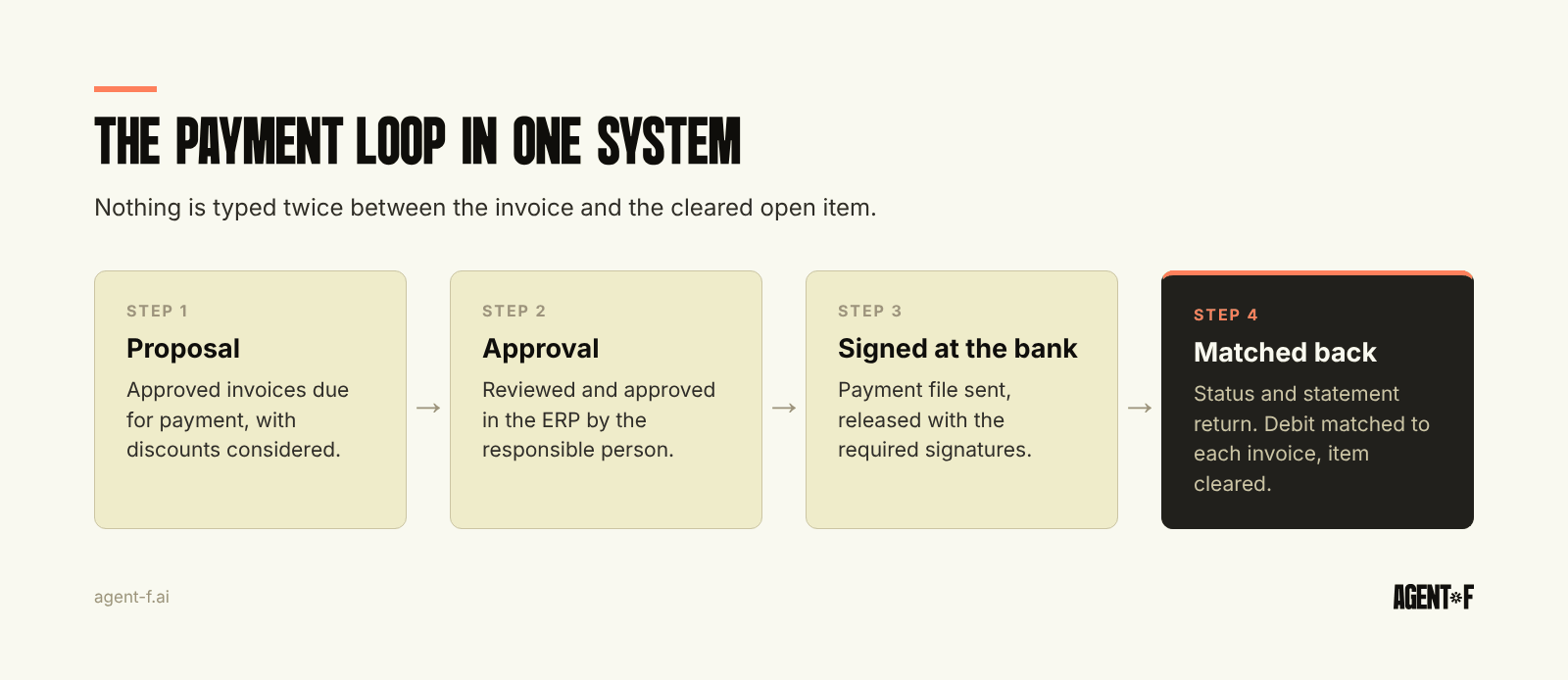
The goal is a closed loop where nothing is typed twice:
- Approved invoices due for payment are collected into a payment proposal, considering due dates and early payment discounts. Our guide to batch payment runs covers how to choose what goes in.
- The proposal is reviewed and approved in the ERP by the person responsible.
- The ERP creates the payment file and sends it through EBICS. At the bank, it is released with the required signatures.
- The bank returns a status report. Rejected items, for example because of a closed account, come back to the ERP as open items with a reason.
- The next statement shows the debit, and the system matches it to the batch and to each invoice. The supplier's open item is cleared.
The same logic applies to incoming money. Customer transfers are matched from the camt fields. Payouts from payment providers need an extra step because one payout bundles many sales and fees, which we cover in Stripe and payment providers in the ledger.
Who should be allowed to do what?
Bank connectivity moves money, so the rights model matters as much as the technology. Separate the person who prepares a payment run from the person who releases it, and set the bank-side signature rights to match. Keep limits per user at the bank, not only in the ERP, so that a compromised account in one system is not enough. Log every change to supplier bank details with who changed it and when, and require a second check before the next payment to a changed IBAN.
How does Agent F connect your banks to your finance processes?
In Agent F, bank connections run directly into the ledger. Agent F connects to German and European banks such as Deutsche Bank, Sparkasse, Commerzbank, Qonto, Revolut and N26, so statements arrive without downloads and are available to accounts payable, receivables and the cash view at the same time.
Payments are prepared in Agent F from approved invoices. The system proposes the payment run, with due dates and discounts taken into account, and a person approves it. The payment is then executed at the bank. When the statement comes back, Agent F suggests the match between the debit and the invoices it settled, each with a confidence score, and a person confirms the cases that are not clear. Every step, from approval to match, is in the immutable audit trail, and the bookings reach your tax advisor through the DATEV export.
Before you set anything up, list every account per entity and note how it is accessed today. Ask your main bank about EBICS access and signature rights, decide on your position on the Verification of Payee opt-out for batches, and clean the supplier bank details before the first automated run.
Learn how Agent F works, or see it on your own bank data at agent-f.ai/demo.
This article is for general information only and does not constitute tax or legal advice. Parts of it were generated with AI. Please consult your tax advisor or legal counsel before acting on it, and feel free to reach out at team@agent-f.com with any questions or for support.