Updated
Cost center accounting: setting up cost centres that survive the DATEV export
Cost center accounting assigns every cost to the part of the company that caused it, such as sales, product, production or a location, so each manager can see their own budget against actuals. In a German company it runs next to the SKR04 accounts, not inside them: the account says what was spent, the cost centre (Kostenstelle) says where. Both must reach your tax advisor intact through the DATEV export.
Most cost centre plans fail quietly. They are designed in a workshop, work for three months, and then drift: new teams appear without codes, card payments land without a cost centre, and the tax advisor's export drops what the ERP had. A plan is only as good as the bookings that carry it every month.
What is a cost centre, and how is it different from an account?
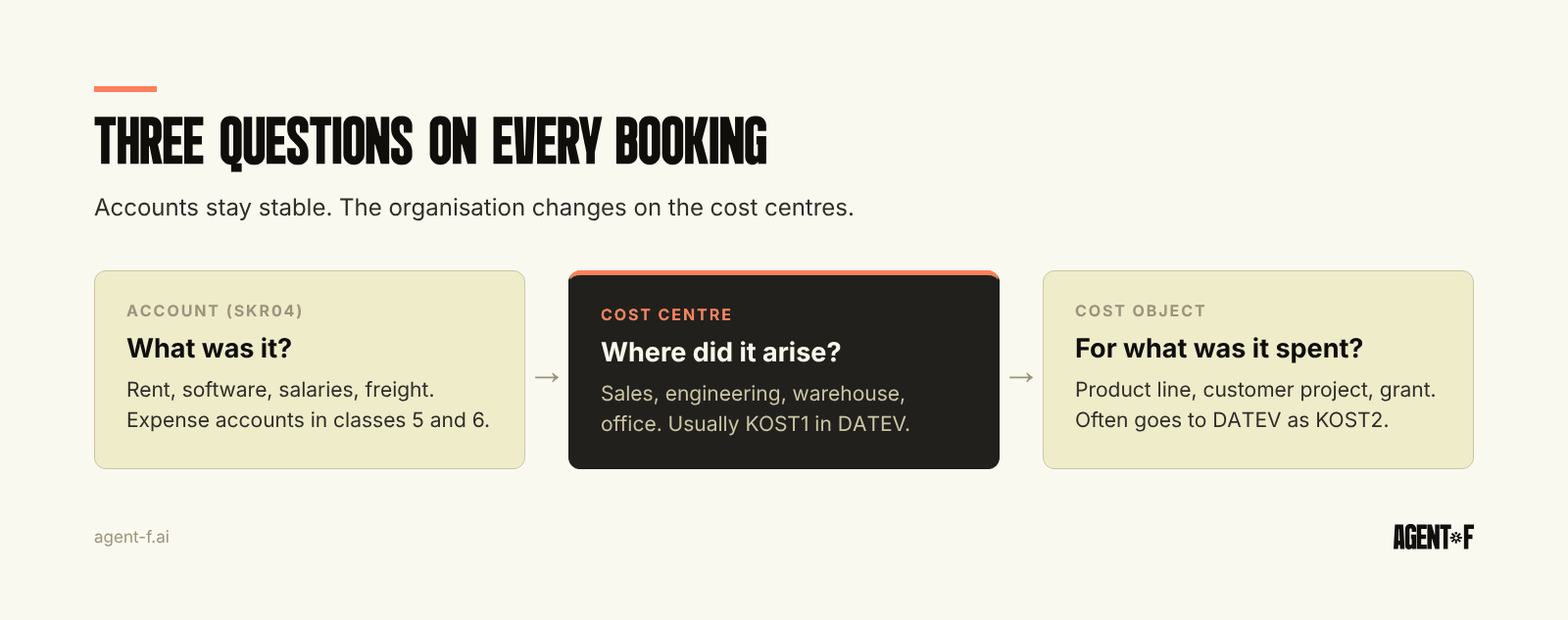
Every cost booking answers three separate questions.
- What was it? The account. Rent on the rent account, software on the IT account, salaries on the wage accounts. In SKR04 these are mainly the expense accounts in classes 5 and 6.
- Where did it arise? The cost centre. Marketing, engineering, warehouse Hamburg, the Munich office.
- For what was it spent? The cost object (Kostenträger). A product line, a customer project, a grant, an order.
The most common design mistake is to answer the second or third question with the first. A company that creates "Software Marketing", "Software Engineering" and "Software Sales" as separate accounts ends up with a chart of accounts nobody can read and a P&L that no longer compares with last year. Accounts stay stable, and the organisation changes on the cost centres. The reasoning is in our guide to general ledger structure.
Cost objects matter as soon as you want margins rather than budgets. Where costs per product or per customer are the goal, see contribution margin by product, customer or project. For delivery businesses, project costs are their own topic, covered in project accounting.
How many cost centres does a growing company need?
Fewer than most plans contain. A cost centre is worth having if three things are true: someone is responsible for it, it has a budget, and someone will look at its report every month. A cost centre without an owner is a label, not a control.
For a 30 to 100 person company, a plan often looks like this:
- Main cost centres for the departments that hold a budget: sales, marketing, product and engineering, operations or production, and general administration.
- Service cost centres (Hilfskostenstellen) for costs that serve everyone: the office, IT, the vehicle fleet. Their costs are later allocated to the main cost centres.
- Location cost centres only if sites are managed separately, for example a second warehouse or a production facility with its own manager.
Use a numbering scheme with gaps, for example 1000 for sales, 2000 for marketing, 3000 for product, so a new team gets 3100 without renumbering. Keep codes short, made of digits or a few letters, and keep the names in a separate master list. A code that encodes a person's name or a project that ends next year will need cleaning before the year is out.
Write the plan down in one place: code, name, owner, budget and the date it was created or closed. That list is what the tax advisor, a new controller and an auditor will ask for, and it is the first thing that goes missing when the plan lives in someone's head.
Not every account needs a cost centre. Revenue, cost of goods and the operating expense accounts benefit. Balance sheet accounts, taxes and interest usually do not, and forcing a cost centre onto them adds work without information.
How do cost centres travel through the DATEV export?
This is where many plans break. The booking batch in DATEV format carries two cost dimensions per booking line, called KOST1 and KOST2. A common convention is KOST1 for the cost centre and KOST2 for the cost object, but you can use them as you agree with your tax advisor. What does not exist is a third or fourth dimension. If your ERP tracks department, location, project and product on every booking, two of them will not reach DATEV.
Four rules keep the export clean:
- Agree the mapping before the first export. Which internal dimension goes into KOST1, which into KOST2, and what stays internal.
- Use the same codes on both sides. The tax advisor needs the cost centre master data too, or the codes arrive as numbers without names.
- Decide what happens to a booking without a cost centre. It should be stopped or flagged before the export, not discovered in the tax advisor's evaluation.
- Do not change codes mid-year. A renamed cost centre is fine. A renumbered one breaks the comparison with every earlier month.
Once that works, the cost centre report your tax advisor produces and the one your controller builds show the same numbers. The general contents of the monthly hand-over are in the DATEV export.
Where do cost centre assignments go wrong?
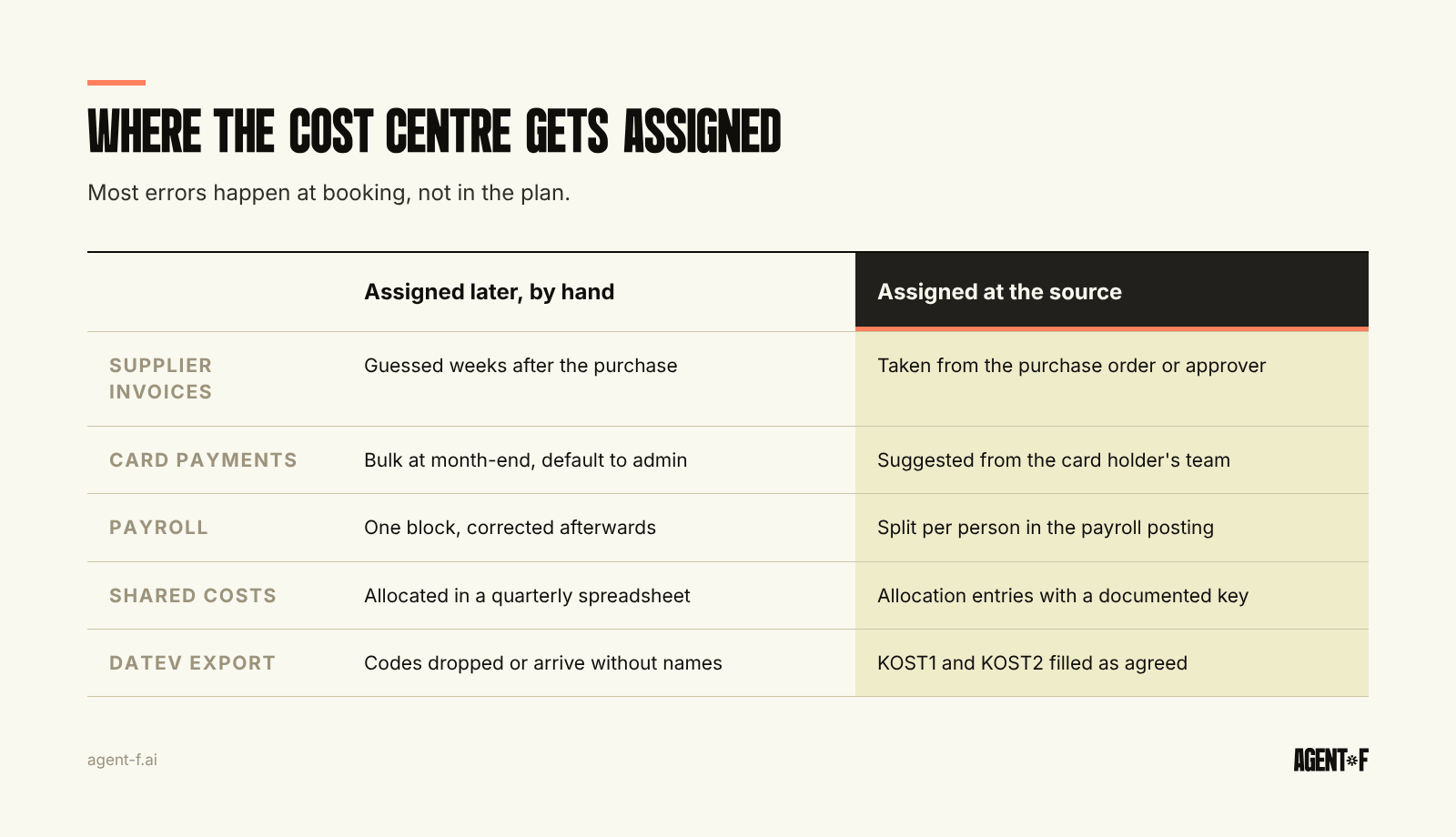
Rarely in the plan. Almost always in the booking.
Supplier invoices are assigned by whoever books them, often weeks after the purchase and without knowing who ordered. The fix is to capture the cost centre at the purchase order or at approval, when the person responsible is still involved.
Card payments and expenses arrive in bulk at month-end. Without a cost centre on each card or each receipt, someone guesses, and the guess goes to general administration.
Payroll is booked as one block per month. If one person works for two cost centres, the split has to be part of the payroll posting, not a correction afterwards.
Shared costs such as rent, insurance and software licences are booked once and need to be spread. In Germany this allocation (Umlage) is traditionally done in a spreadsheet using a key such as headcount or floor space. Fine for a quarterly view, but it means the monthly cost centre report never shows full costs.
The result is familiar: a budget vs actual report where one cost centre is always over and another always under, and the explanation is a booking habit, not spending. We describe how to read and act on the variances in budget vs actual per cost centre.
How does Agent F put every cost on a cost centre?
In Agent F, cost centres and cost objects are dimensions on the same data model as the SKR04 accounts, not a separate controlling tool. Every booking can carry them, whether it comes from a supplier invoice, a card payment, an expense receipt, a payroll posting or an order.
When an invoice or a card payment arrives, Agent F suggests the cost centre together with the account, each with a confidence score and a reason: the supplier's history, the purchase order it belongs to, or the card holder's team. A person confirms or corrects, and the system learns from the correction. Bookings without a cost centre are flagged before the period closes. Allocations of shared costs are booked as regular entries with a documented key, and they go through the same approval as any other entry. Every assignment and change is in the immutable audit trail.
Budgets are held per cost centre, so the budget vs actual view uses the same bookings as the ledger. The DATEV export fills KOST1 and KOST2 according to the mapping agreed with your tax advisor.
To start, list your current cost centres and mark the ones without an owner or a budget. Agree with your tax advisor which dimensions go into KOST1 and KOST2. Then take last month's card payments and supplier invoices and count how many had no cost centre or landed on administration by default. That number shows where the plan needs help.
Learn how Agent F works, or see it on your own cost centres at agent-f.ai/demo.
This article is for general information only and does not constitute tax or legal advice. Parts of it were generated with AI. Please consult your tax advisor or legal counsel before acting on it, and feel free to reach out at team@agent-f.com with any questions or for support.