Updated
Accounting automation: where to start, and why the hand-offs stay manual
Accounting automation means letting software do the repeatable steps of bookkeeping: reading invoices, matching bank transactions, suggesting bookings, preparing recurring entries and building reports. Most mid-sized companies already automate parts of this. The time they lose sits elsewhere, in the exports, imports and spreadsheet checks that move data between the bank, the invoice tool, DATEV and the reporting file.
That is the thesis of this article. Each tool can be automated on its own, and the month still feels manual, because nobody automated the space between them. Scripting those hand-offs rarely holds for long, so the lasting fix is to remove them.
What can accounting automation actually do today?
A useful way to sort the options is by the kind of work they replace.
Data entry. Reading supplier invoices, receipts and bank statements and turning them into structured records. With e-invoices this step disappears, because the data already arrives in fields. With PDFs, text recognition reads the fields and a person checks the result.
Matching. Pairing a payment with the open invoice it belongs to, an invoice with its purchase order, or a card transaction with its receipt. This is rules plus pattern recognition: amount, date, reference, counterparty and your own history.
Suggesting bookings. Proposing the account, cost centre and VAT treatment for a transaction, based on how similar items were booked before. AI is good at this when the history is clean, and it should show how sure it is.
Recurring work. Depreciation, prepayment schedules, accruals for known costs, payroll postings and intercompany charges. These follow schedules and can be prepared without anyone typing them.
Reporting. Turning bookings into a P&L, a BWA (the monthly management report from your tax advisor) or a budget comparison without a copy-paste step.
What automation does not do is take responsibility. Judgement calls, unusual transactions and the final sign-off stay with people. We look at that boundary more closely in where AI belongs in accounting.
Why does the work between tools stay manual?
Picture a common setup in a German company with 50 people. Bank transactions sit in two or three online banking portals. Supplier invoices go through an invoice tool with its own approval flow. Outgoing invoices come from a billing system. The tax advisor (Steuerberater) books everything in DATEV. Management reporting is built in Excel from a DATEV export.
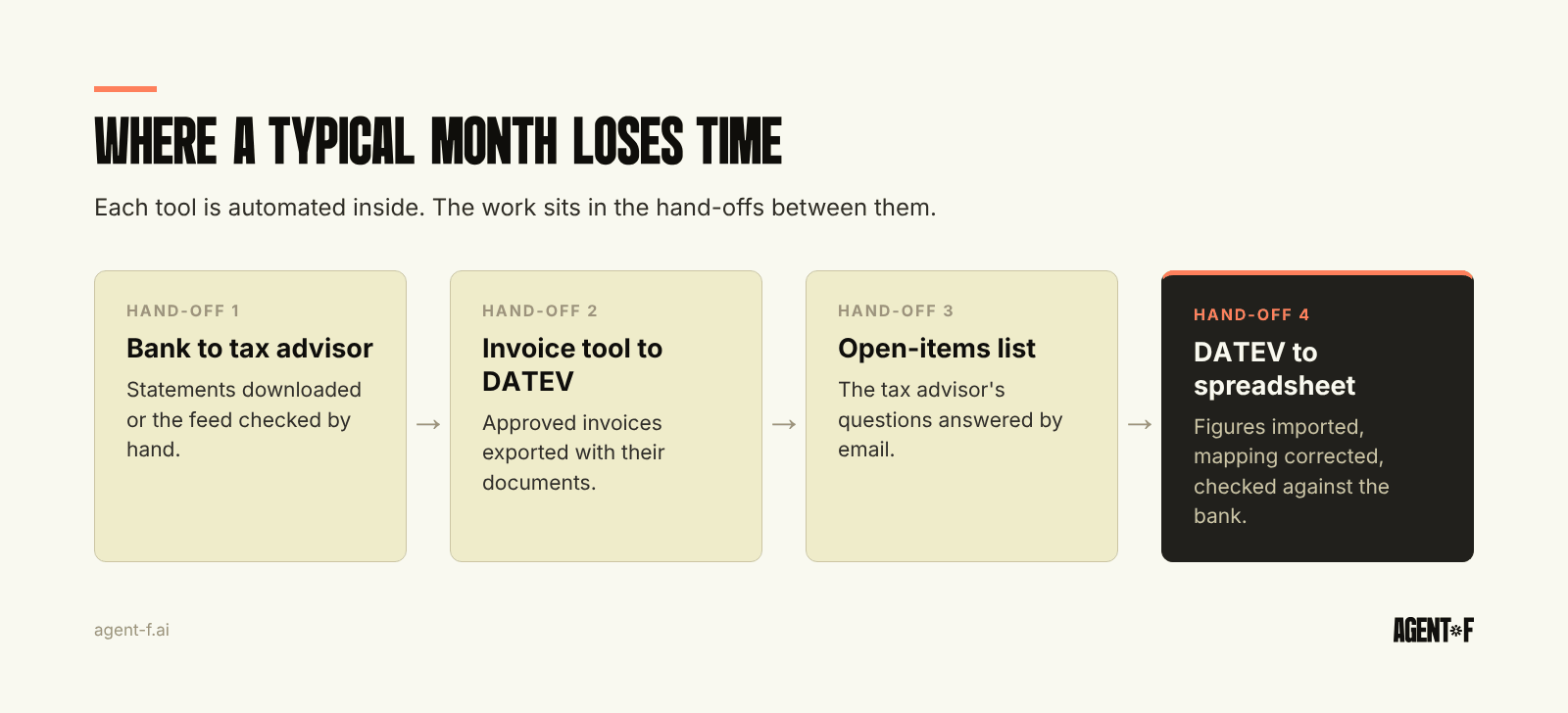
Each tool may be well automated inside. The invoice tool reads PDFs. The bank portal categorises payments. DATEV applies booking rules. But the month still runs on hand-offs:
- Someone downloads bank statements or checks that the bank feed reached the tax advisor.
- Someone exports approved invoices and makes sure each one arrives with its document.
- Someone answers the tax advisor's list of open items, usually by email.
- Someone imports the DATEV figures into a spreadsheet and corrects the mapping.
- Someone reconciles the spreadsheet against the bank balance before the numbers go to management.
None of these steps is hard. Together they are where days go, where errors enter and where knowledge sits in one person's head. When that person is on holiday, the close waits.
Why do scripts and connectors not fix the hand-offs?
The first instinct is to connect the tools: an integration platform, a scheduled export, a macro that reformats the DATEV file. That helps for a while. Then it creates its own problems.
Every connector copies data from one system into another. Once data exists twice, someone has to check that both copies agree. A supplier renamed in one tool, a cost centre added in another, a booking corrected by the tax advisor after the export: each creates a difference that the connector does not see. Teams end up with a reconciliation step for each integration, which is a hand-off again under a different name.
Connectors also break quietly. A field changes, a bank updates its format, a password expires. The data stops flowing, and nobody notices until the numbers look wrong at month-end.
There is a compliance side too. Under the GoBD (German digital bookkeeping rules), your process documentation (Verfahrensdokumentation) must describe how data flows through your systems. Every connector, script and manual import is one more thing to describe, test and keep current.
Where should accounting workflow automation start?
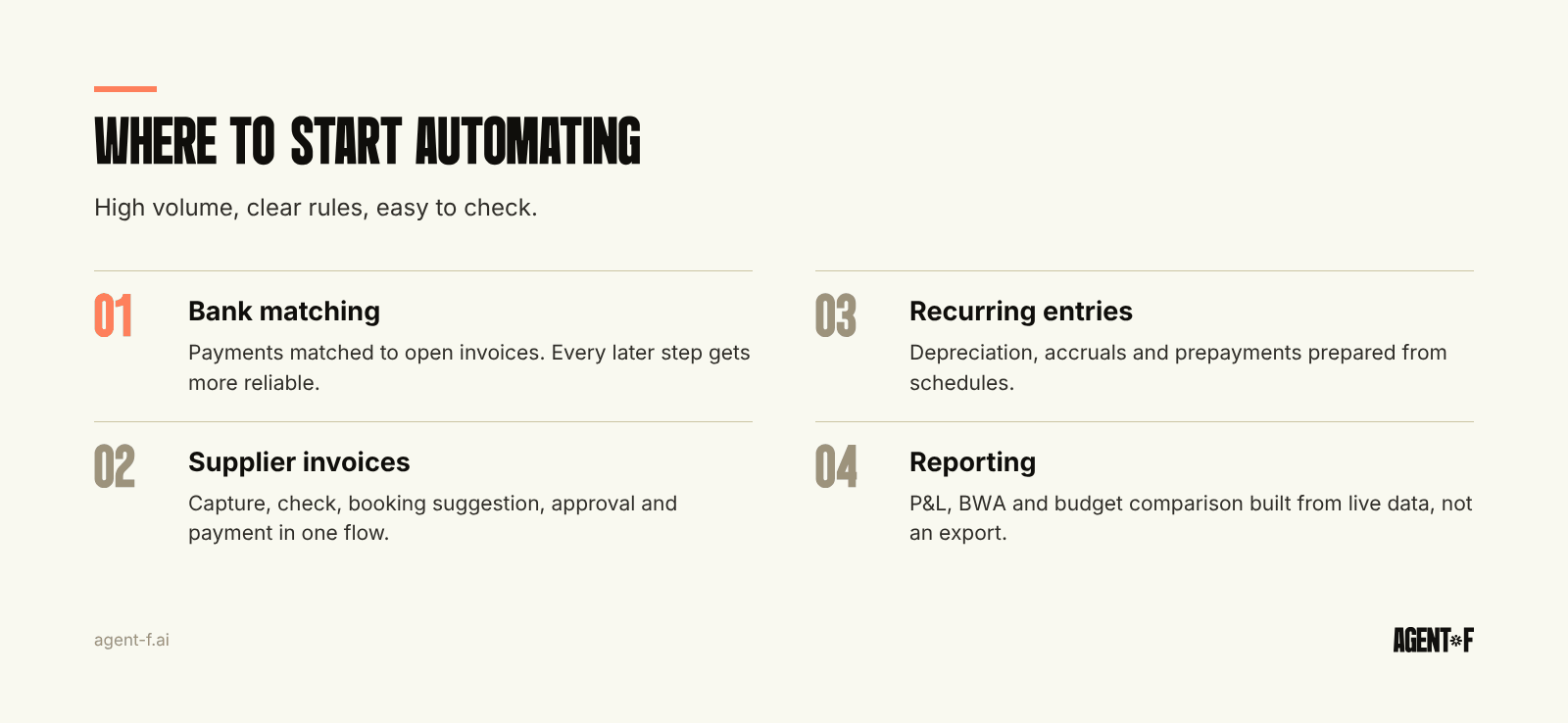
Start where the volume is high, the rules are clear and the result is easy to check. In most companies, that order looks like this.
1. Bank matching. Every booking eventually meets a bank line. Matching payments to open invoices automatically removes the largest single block of manual work and makes every later step more reliable. Why it is still manual in many companies is covered in payment reconciliation, and how to finish it before month-end in bank reconciliation that finishes before month-end.
2. Supplier invoices. Capture, check, booking suggestion, approval and payment. This is where the most documents flow and where e-invoicing is changing the input format anyway.
3. Recurring entries. Depreciation, accruals and prepayments follow a schedule. Preparing them automatically shortens the close without touching judgement.
4. Reporting. Once the bookings are current, reports can be built from live data rather than from an export.
Two rules help at every step. First, measure the acceptance rate of suggestions, not only the time saved. If people overwrite most suggestions, the data or the rules need work. Second, never automate a step you cannot trace. Every automatic booking should show where it came from and who approved it.
What should you check before choosing a tool?
Ask how many copies of your data the new tool creates. A tool that adds one more export to DATEV and one more import into Excel automates its own step and adds two hand-offs.
Ask how suggestions are approved. You want to see the suggestion, the reason and a confidence level, and you want a person to confirm it before it reaches the ledger.
Ask what happens with your tax advisor. In Germany, the DATEV connection decides whether automation saves time or moves work to the Steuerberater's office. How the pieces fit at this company size is covered in the finance tech stack for a 50-person company.
How does Agent F remove the hand-offs instead of scripting them?
Agent F is an AI-native ERP: the ledger, payables, receivables, bank, expenses, reporting and month-end close sit on one data model. A supplier invoice, its approval, its booking and its payment are one record, not four copies in four tools. That is why there is nothing to export between steps. The idea behind it is explained in what an AI-native ERP is.
The AI layer works through your existing process. It matches bank transactions to open items, suggests account, cost centre and VAT treatment from your booking history, and prepares accruals, depreciation and prepayment schedules at month-end. Each action is a suggestion with a confidence score. A person approves it, and every step lands in an immutable audit trail. Categorisation learns from your corrections. Customers typically reach 90 percent or more reconciliation accuracy by month three.
Your tax advisor keeps working in DATEV. Bookings and documents leave through the DATEV connection in the format the Steuerberater expects, so the hand-off becomes an export you check, not a list of open questions. Reports, including the BWA, come from the same live data, so the spreadsheet step disappears.
Companies that move from a set of tools to one system usually go from a 5 to 10 day close to 1 to 2 days, and replace five or more tools. Implementation takes 4 to 10 weeks, with an onboarding period that runs in parallel to your current setup.
To find your own starting point, list every export, import and spreadsheet check in last month's close, with the person who did it and the time it took. Mark the ones that exist only because two tools do not share data. Then decide whether to automate those hand-offs or remove them.
Learn how Agent F works, or see it on your own bookings at agent-f.ai/demo.
This article is for general information only and does not constitute tax or legal advice. Parts of it were generated with AI. Please consult your tax advisor or legal counsel before acting on it, and feel free to reach out at team@agent-f.com with any questions or for support.