Updated
Automated bank reconciliation: closing the bank accounts before month-end
Automated bank reconciliation means the system imports every bank statement each day, suggests which booking or open item each transaction belongs to, and leaves people only the lines it cannot explain. Done daily, the bank accounts are reconciled before the month ends, and the closing step is a balance check rather than a week of matching lines in a spreadsheet.
Most companies already have bank feeds. What they lack is a routine and a single place for all accounts. The bank side breaks because statements from three banks, PayPal and Stripe arrive in different shapes and end up in different tools.
Why does bank reconciliation still pile up at month-end?
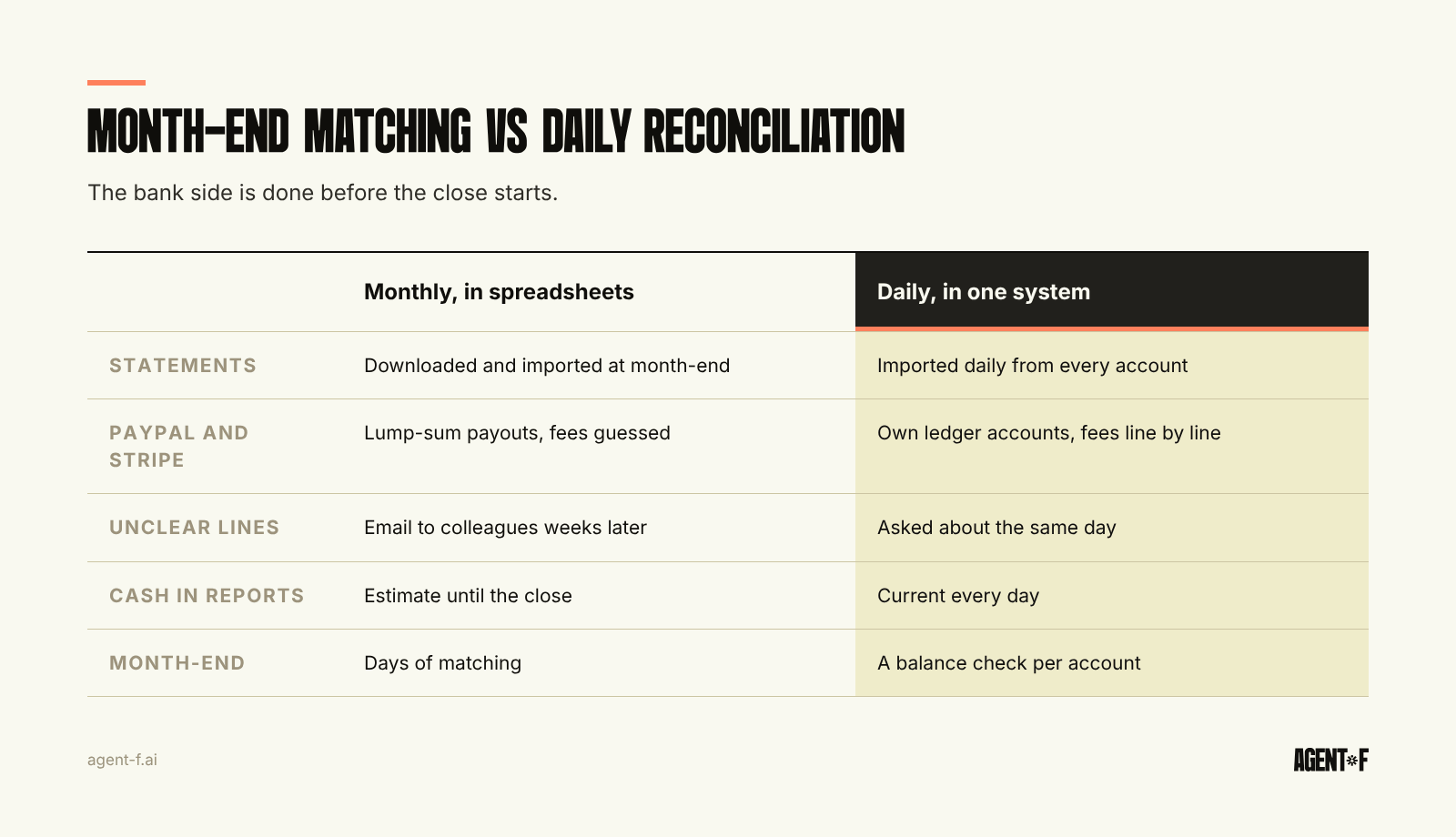
In a typical 50-person German company, the bank picture looks like this: a main account at a Sparkasse or a large bank, a second account at a digital bank for cards, perhaps a loan or deposit account, plus PayPal and Stripe for customer payments. Each source has its own export, and the accounting tool handles some of them well and others not at all.
So the work waits. Statements are downloaded at month-end, imported in batches and matched by whoever has time. Every unclear line becomes an email to a colleague who may not remember a payment from three weeks ago. Until that answer arrives, the line sits on a suspense account and the month cannot close.
The German bookkeeping rules (GoBD) add a timing point. They treat recording non-cash transactions within ten days as unobjectionable, and a booking backlog of several weeks is harder to defend. Reconciling monthly is not a breach in itself, but it makes timely recording depend on discipline rather than process.
There is also a quieter cost. If the bank accounts are only reconciled once a month, the cash figure in every report during the month is an estimate. Finance then keeps a separate cash view in a spreadsheet, which is the problem we describe in cash management across banks and entities.
What has to happen before matching can be automated?
Automation depends on the quality of the bank data. Three things matter.
A direct connection for every account. Statements should arrive daily without anyone downloading a file. In Germany, that usually means EBICS for business accounts at established banks, or an API connection for digital banks. Accounts that still need manual uploads are the ones that fall behind.
Structured statement formats. The German banking industry (Deutsche Kreditwirtschaft) ended its rulebook for the older MT940 statement format in November 2025 in favour of the ISO 20022 camt formats. A camt.053 statement carries the remittance information, the counterparty and references in separate fields, which makes matching more reliable. Ask each bank which format you receive today and how long it will still deliver MT940.
Batch bookings broken down. A single debit for a payment run, or a single Stripe payout, often covers dozens of individual items. If the statement only shows the total, the system cannot match it. The detail, from the bank or from the payment provider, has to arrive with it.
How do you reconcile PayPal and Stripe alongside the bank?
Payment providers are where reconciliation usually breaks. A customer pays 119 euros through Stripe. Stripe deducts its fee, adds the amount to a balance and pays out the total, perhaps a few days later, to your bank account as one lump sum. PayPal works in a similar way, sometimes with currency conversion in between.
The clean way to book this is to treat each provider as its own account in the ledger, a clearing account that works like a bank account:
- Each customer payment is booked from the provider account against the open invoice.
- Each fee is booked as an expense, with its own VAT treatment.
- Each payout is a transfer from the provider account to the bank account.
When this is set up, the provider account should return to zero, or to the balance the provider shows, after every payout. If it does not, something is missing: a refund, a chargeback or a fee nobody booked. The matching of payments to invoices is covered in payment reconciliation. The point here is the account structure that makes that matching possible.
What does a daily reconciliation routine look like?
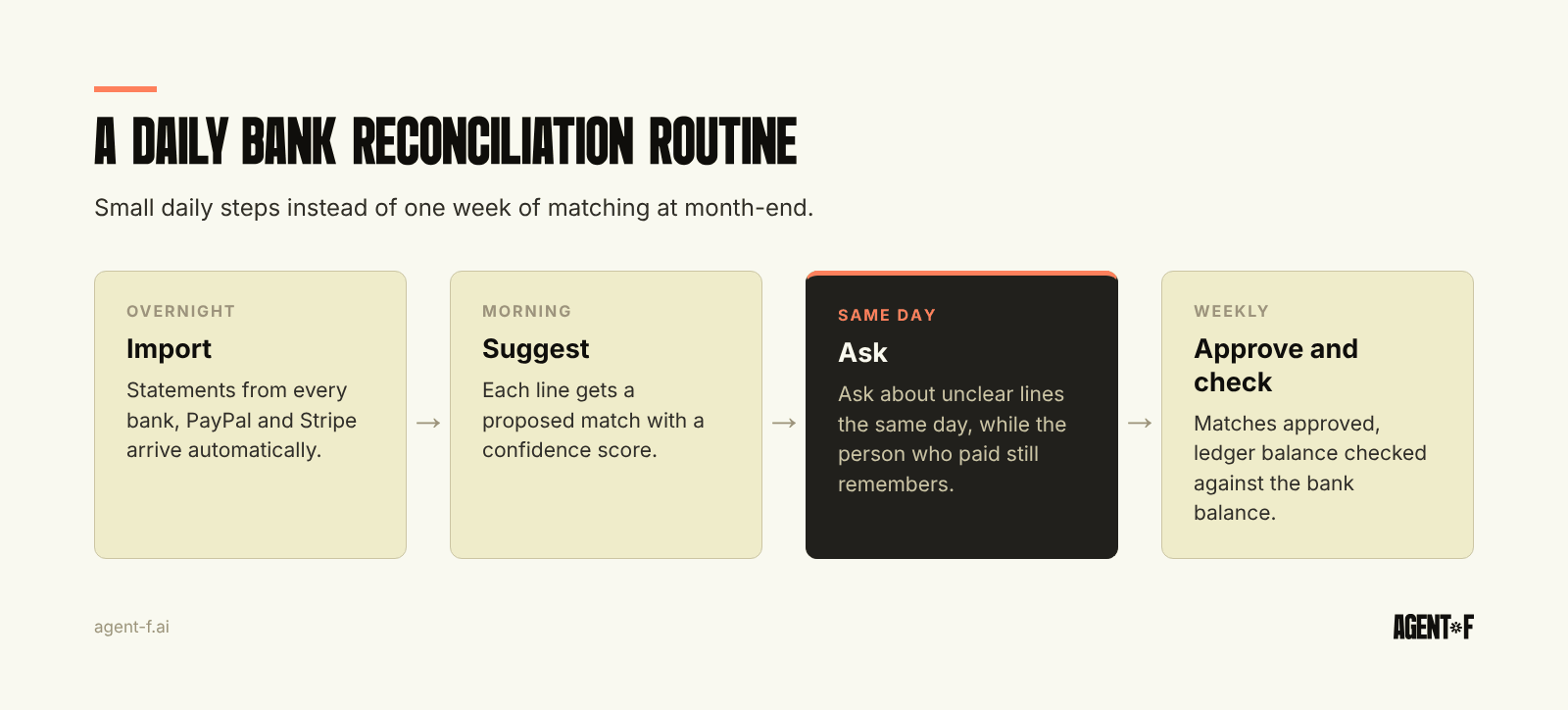
A routine that finishes before month-end is less about software than about rhythm. A workable version looks like this:
- Overnight: statements from every bank and provider are imported automatically.
- Morning: the system proposes a match for each line: an open invoice, a payroll run, a recurring direct debit, a transfer between your own accounts. Matches with high confidence are confirmed in one pass.
- During the day: lines the system cannot explain go to the person who knows. A card payment goes to the cardholder, an unknown incoming payment goes to whoever handles receivables, a supplier refund goes to purchasing.
- Weekly: the ledger balance of every account is checked against the bank balance, and anything left on the suspense account is reviewed.
- Month-end: a final balance check per account, and the bank side is done.
Routing matters most. The person in finance rarely knows what a payment of 312.40 euros to a hardware store was for. The colleague who made it does, and can answer in a minute if asked the same day. Unknown incoming payments are often partial or combined customer payments, and how quickly they are cleared decides whether dunning and receivables work on correct balances.
Two kinds of lines deserve fixed rules rather than daily judgement. Transfers between your own accounts appear twice, once leaving one account and once arriving in another, often on different days. Book them through a transit account so that both sides are matched and the account returns to zero. Recurring items, such as rent, leasing, insurance and loan repayments, follow the same pattern every month. Once the first one is matched and confirmed, the rest should be matched without anyone looking at them, and only a change in amount should bring them back to a person. Together, these two groups often make up a large part of the lines on a business account, and settling them by rule leaves the team with the lines that need a question.
How does Agent F help you reconcile your bank accounts?
In Agent F, bank accounts, PayPal and Stripe sit in one matching view. Agent F connects directly to German and European banks, including Deutsche Bank, Sparkasse, Commerzbank, Qonto, Revolut and N26, and imports transactions daily. Payment providers are set up as their own accounts in the ledger, so payouts, fees and refunds are visible line by line.
For each transaction, Agent F suggests a match with a confidence score: an open receivable or payable, a recurring cost, a transfer between your own accounts or a booking based on your history. You confirm the suggestion, change it or reject it. Lines the system cannot explain stay open and visible until a person clears them. Every match, change and approval is kept in an immutable audit trail.
The matching learns from your corrections. Teams typically reach 90 percent or more reconciliation accuracy by the third month, so the share of lines that need a person keeps shrinking. Because the bank side and the ledger are one data model, the cash figure in your reports is current, and the reconciled bookings flow into the DATEV export for your tax advisor (Steuerberater) without a second import.
What should you do this month?
Start with an inventory: list every bank account and payment provider, and note how its statements reach your books today and in which format. Then pick one account, usually the main operating account, and reconcile it daily for two weeks. Count how many lines needed a person, and who was able to answer them. Set up clearing accounts for PayPal and Stripe if you do not have them yet. Finally, add the bank balance check as a fixed step in your month-end close checklist, so the close confirms the reconciliation instead of doing it.
Learn how Agent F works, or see it on your own bank statements at agent-f.ai/demo.
This article is for general information only and does not constitute tax or legal advice. Parts of it were generated with AI. Please consult your tax advisor or legal counsel before acting on it, and feel free to reach out at team@agent-f.com with any questions or for support.