Updated
Finance tech stack for a 50-person company: what to buy, what to connect
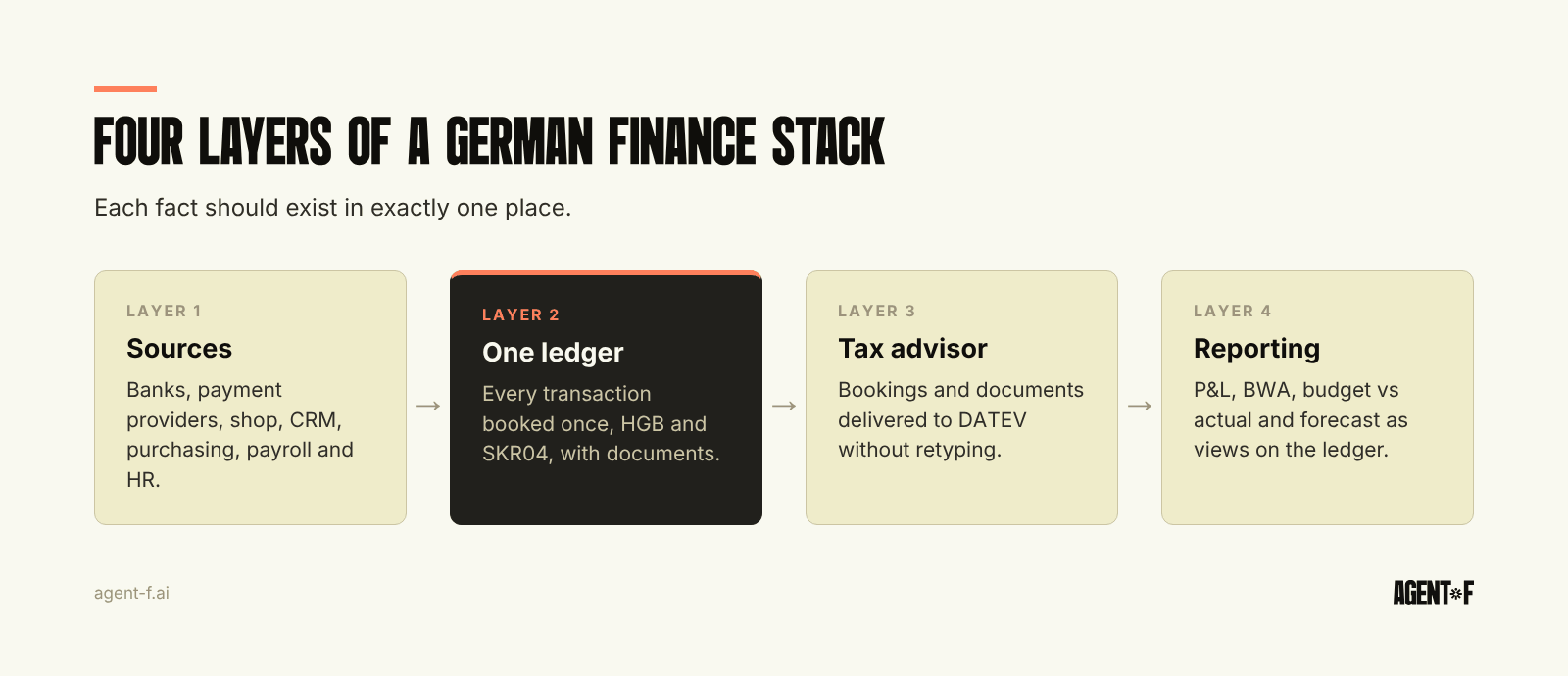
A finance tech stack for a 50-person company in Germany needs four layers: the sources where transactions start (banks, sales, purchasing, payroll), one ledger where they are booked, a clean connection to the tax advisor and DATEV, and reporting built on the ledger. The common mistake is buying a separate tool for each task and then paying, in time and errors, to keep their data in sync.
Most stack guides are written for US companies and list a tool for every box. A German company of this size has different anchors: a tax advisor (Steuerberater) working in DATEV, several house banks, GoBD (German digital bookkeeping rules) and the e-invoicing mandate. The useful question is how many copies of your data you can afford to keep.
What does a typical stack look like at 50 people?
At around 50 people, most companies have grown their stack one problem at a time. A common picture:
- Online banking at two or three banks, each with its own portal.
- An invoicing tool or a billing module for outgoing invoices.
- An invoice capture and approval tool for supplier invoices.
- A card or expense tool for travel and team spending.
- A payroll provider, often a separate payroll office, with an HR system next to it.
- The tax advisor booking everything in DATEV.
- A liquidity tool or a cash spreadsheet.
- Excel for budget, forecast and management reporting.
Each tool was a sensible decision when it was bought. Together they become "100 different Excel sheets flying around", connected by exports, imports and the memory of one or two people. The cost does not appear on any invoice. It shows up as a close that takes a week or more, a BWA (the monthly management report from your tax advisor) that arrives weeks after month-end, and numbers that differ depending on which tool you ask. How these workarounds build up is described in ERP complexity debt.
Which layers does a finance stack need at 50 people?
Think in layers, not in tools.
1. Sources. Where transactions start: bank accounts, payment providers, the online shop, the CRM or order system, purchasing, payroll and time tracking. These systems exist for operational reasons and will stay.
2. The ledger. One place where every transaction is booked, with accounts, cost centres and documents. In a German company this follows HGB (the German Commercial Code) and usually the SKR04 chart of accounts. This is the layer that should never exist twice.
3. The tax advisor connection. Your Steuerberater needs bookings and documents in DATEV for the VAT returns, the payroll checks and the annual accounts. Whether bookkeeping happens in-house or at the advisor's office, this hand-off must be clean. How to split the work is covered in working with your tax advisor.
4. Reporting and planning. P&L, balance sheet, cash flow, BWA, budget versus actual, forecast and board reports. These should be views on the ledger, not separate files fed by exports.
The test for any stack is simple: does each fact exist in exactly one place? A supplier invoice, its approval, its booking and its payment should be one record that every layer reads, not four copies that someone has to reconcile.
What makes a German stack different from a US one?
Four things change the design.
DATEV is fixed. Almost every German tax advisor works in DATEV. A tool that cannot deliver clean bookings and documents to DATEV moves work to the advisor's office, where it is billed by the hour. Treat DATEV compatibility as a hard requirement, not a feature.
E-invoicing changes the input. Since January 2025, every German business must be able to receive structured e-invoices. Sending becomes mandatory from 2027 for companies above 800,000 euros of turnover and from 2028 for all. That makes invoice capture with text recognition less important over time and makes a ledger that reads XRechnung and ZUGFeRD directly more important.
Payroll often sits outside the company. Many mid-sized companies have payroll run by the tax advisor or a payroll office. The stack then has to bring the payroll journal back into the ledger every month, mapped to cost centres, so that personnel costs in the P&L match what was paid. This is one of the hand-offs most often done by spreadsheet.
Process documentation is required. Under the GoBD, you must be able to describe how data flows through your systems. Every additional tool and every connector adds a chapter to that documentation and a point where an auditor can find a gap.
When should you connect a tool, and when should you replace it?
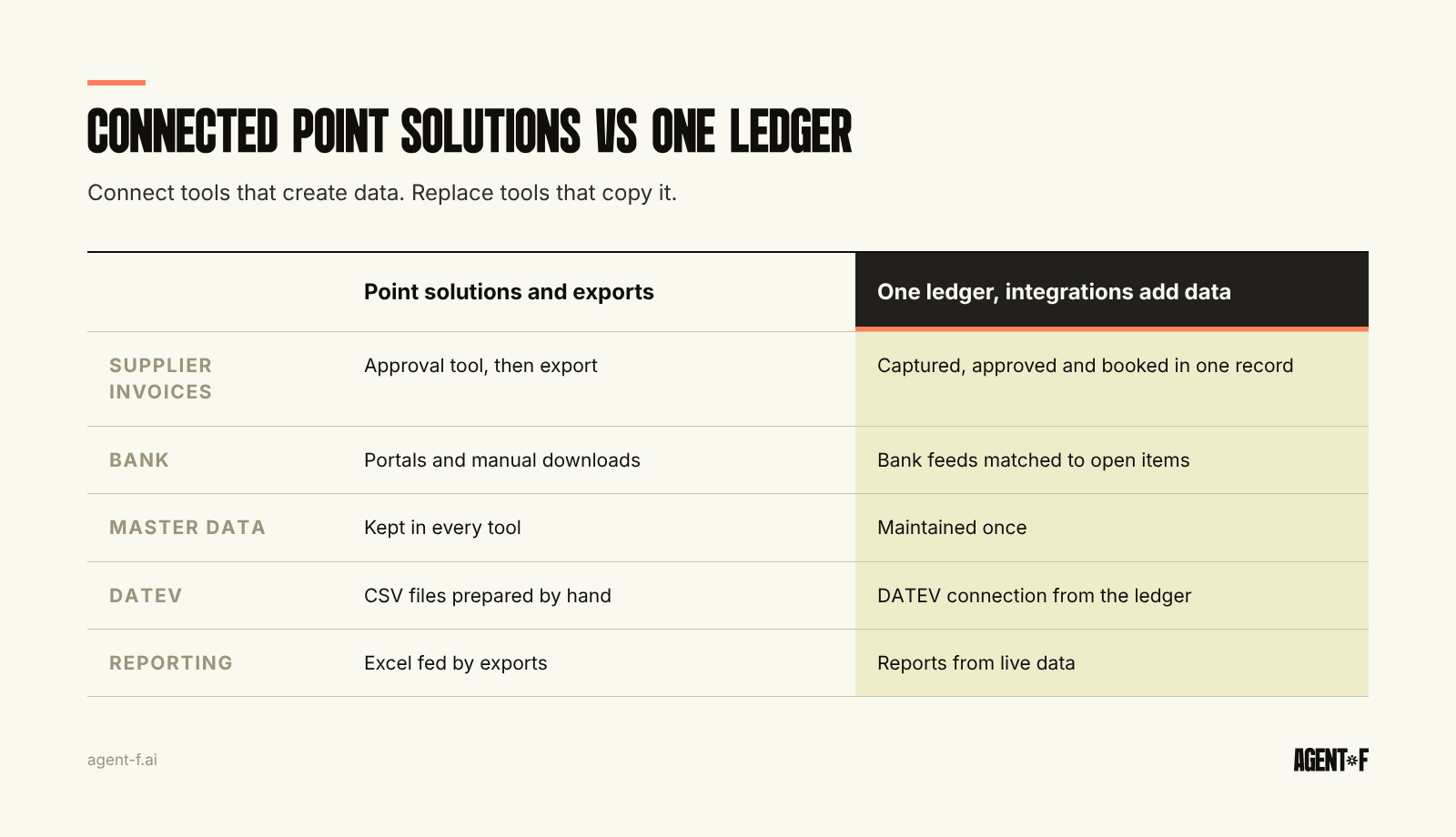
Not every tool should be replaced. The rule we use: connect a system when it adds data the ledger does not have; replace it when it keeps a copy of data the ledger already has.
Connect your banks, payment providers, the online shop, the CRM and the HR system. They create information that starts outside finance: payments, orders, customers, employees. An integration that brings this data into the ledger once is useful.
Replace separate tools for invoice approval, expense capture, receivables, liquidity planning and spreadsheet reporting when they duplicate the ledger. Each of them keeps its own copy of suppliers, customers, cost centres or bookings, and each copy needs reconciling.
A second test is ownership. If a tool is used mainly by finance and its output ends up in the ledger, it is usually part of the ledger's job. If it is used mainly by another team for their own work, connect it.
Signals that the stack has outgrown itself are covered in outgrowing your accounting software. The most reliable one: the close is waiting for exports rather than for decisions.
What should you ask before adding another tool?
Before the next purchase, ask four questions.
- Which data does it create, and which does it copy? Only created data justifies a new system.
- How does it reach the ledger and DATEV? If the answer involves a CSV file and a person, the tool adds a hand-off.
- Who maintains master data? Suppliers, customers and cost centres should be maintained in one place.
- Can you describe it in your process documentation in two sentences? If not, it will be hard to explain to an auditor too.
Why automating each tool separately still leaves the month manual is the subject of accounting automation.
How does Agent F reduce the stack to one ledger?
Agent F is an AI-native ERP, so the ledger layer and much of what sits around it are one system: general ledger, payables and receivables, bank reconciliation, expenses, procurement, invoicing, budgeting and forecasting, and financial reports, all on one data model. The approach is explained in what an AI-native ERP is.
The source systems stay and are connected where they add data: German banks such as Sparkasse, Deutsche Bank or Commerzbank, payment providers, the shop, the CRM and HR systems such as Personio. Your tax advisor keeps working in DATEV through the DATEV connection, with bookings and documents in the expected format.
The AI layer works across the whole flow because there is only one copy of the data. It matches payments to open items, suggests bookings from your history and prepares month-end entries. Each suggestion has a confidence score, a person approves it, and every step is in an immutable audit trail. Data is hosted in Germany.
Companies that move to one system typically consolidate five or more tools and go from a 5 to 10 day close to 1 to 2 days. Implementation takes 4 to 10 weeks, with a free onboarding period running in parallel to the current stack.
A practical first step is to draw your current stack on one page: every tool, what data it holds and how that data reaches DATEV. Mark each tool as "creates data" or "copies data". The copies are your candidates for consolidation.
Learn how Agent F works, or see it on your own stack at agent-f.ai/demo.
This article is for general information only and does not constitute tax or legal advice. Parts of it were generated with AI. Please consult your tax advisor or legal counsel before acting on it, and feel free to reach out at team@agent-f.com with any questions or for support.