Updated
ERP migration and cutover: moving with your history intact
An ERP migration in a German company moves four things: the opening balances, the open items behind them, the master data that new bookings depend on, and access to the history you leave behind. Most companies migrate balances and open items in detail, keep older transactions in an archive, and keep the old data accessible for the tax auditor for the full retention period.
The data load is rarely what goes wrong. What goes wrong is the first close after go-live, when a balance does not reconcile and nobody can trace it back. A migration is finished when the first month closes cleanly in the new system, not when the import runs.
What actually has to move?
Start by separating what the new system needs to work from what you need to keep.
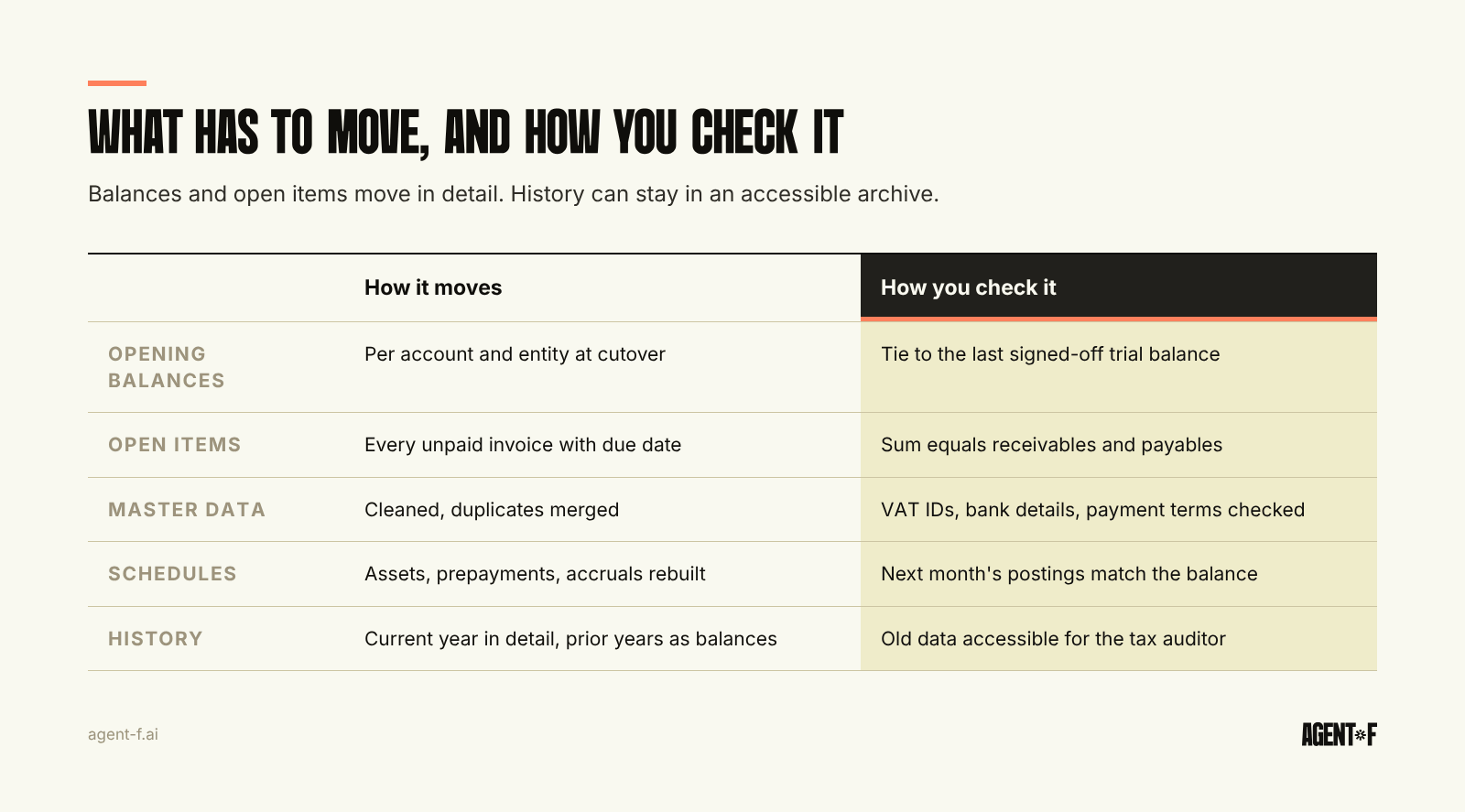
Opening balances. Every balance sheet account, per entity, as of the cutover date. For a cutover at the start of the financial year, these are the closing balances from the old system, carried forward (Saldenvorträge). They must tie to the last trial balance your tax advisor (Steuerberater) signed off.
Open items. The balance on receivables and payables is not enough. You need every unpaid customer and supplier invoice, with its due date, amount, currency and reference, so that dunning, payment runs and cash matching work from day one. Open items must add up exactly to the receivables and payables balances.
Master data. Customers, suppliers, items, cost centres, bank accounts, VAT IDs and payment terms. This is where most of the clean-up happens, because duplicates and outdated records have been accumulating for years.
Running schedules. Fixed assets with their acquisition dates and remaining useful lives, prepayments being released over time, accruals, deferred revenue, loans and leases. A balance carries the amount, not the instruction for next month. Each schedule needs to be rebuilt in the new system and checked against the balance.
History. Past transactions and documents. You may migrate the current year, several years, or none, and keep the rest in an archive. That is a decision about reporting and analysis, not about compliance, as long as the archive meets the rules described below.
How much history should you migrate?
There is no single right answer, but there is a useful default. Migrate the current financial year in detail if you cut over mid-year, so that year-to-date reports and the annual financial statements work from one system. Migrate prior years as monthly balances per account and cost centre, so comparisons and trends work. Keep the underlying transactions and documents of earlier years in their original system or archive.
Full transaction history sounds safer but brings costs: old bookings were made against an old chart of accounts, sometimes with codes nobody remembers. Mapping them all is expensive, and mapping errors in 2021 data can make 2027 reports look wrong.
Whatever you decide, write it down, with the reasons. Your process documentation (Verfahrensdokumentation) under the German bookkeeping rules (GoBD) should describe where each year's data lives after the change.
How do you keep the old data audit-ready?
German law cares less about where your history is than about whether it stays accessible. Booking documents must be kept for eight years, books and annual financial statements for ten, under § 147 of the German Fiscal Code (AO). During that time, the tax auditor has the right to inspect the data in the system, have it evaluated, or receive it in a machine-readable format.
A system change does not suspend that right. The AO contains a specific relief: if no tax audit has started, it is enough to hold the old data on a machine-readable and machine-analysable data carrier only after the fifth calendar year following the change. Until then, plan for full access. In practice, that means either keeping a read-only licence for the old system, or exporting the data into an archive that supports the same analysis, and confirming with your tax advisor that the export is complete.
If your bookkeeping so far was done by your tax advisor in DATEV, much of the history already sits there. Agree with the advisor which data they hold, for how long, and how you get access during an audit. What the monthly exchange looks like after the switch is covered in the DATEV export.
How do you map the chart of accounts and clean master data?
The chart of accounts mapping is the most important single document in an ERP data migration. Each old account maps to one new account, or is split by a rule. If the old system mixed account and cost centre in one code, for example a separate travel account per department, the migration is the moment to separate them into an account and a dimension. How to design that structure is explained in general ledger structure.
Most German companies move to, or stay on, SKR04 or SKR03, because that is what the tax advisor expects. Keep a mapping register with an owner for every decision and test it on one month of real data before the full load.
Master data needs the same care. Merge duplicate suppliers, close inactive customers, check VAT IDs and bank details, and decide which records move at all. In a group, do this per entity and agree the intercompany counterparties early, as described in multi-entity accounting.
How do you plan the cutover?
The cleanest cutover date is the first day of a financial year. The old system closes the year, the tax advisor prepares the annual accounts from it, and the new system starts with opening balances. If that is not possible, the first day of a quarter or month still works, provided the advance VAT return (UStVA) for the last period in the old system is filed from there.
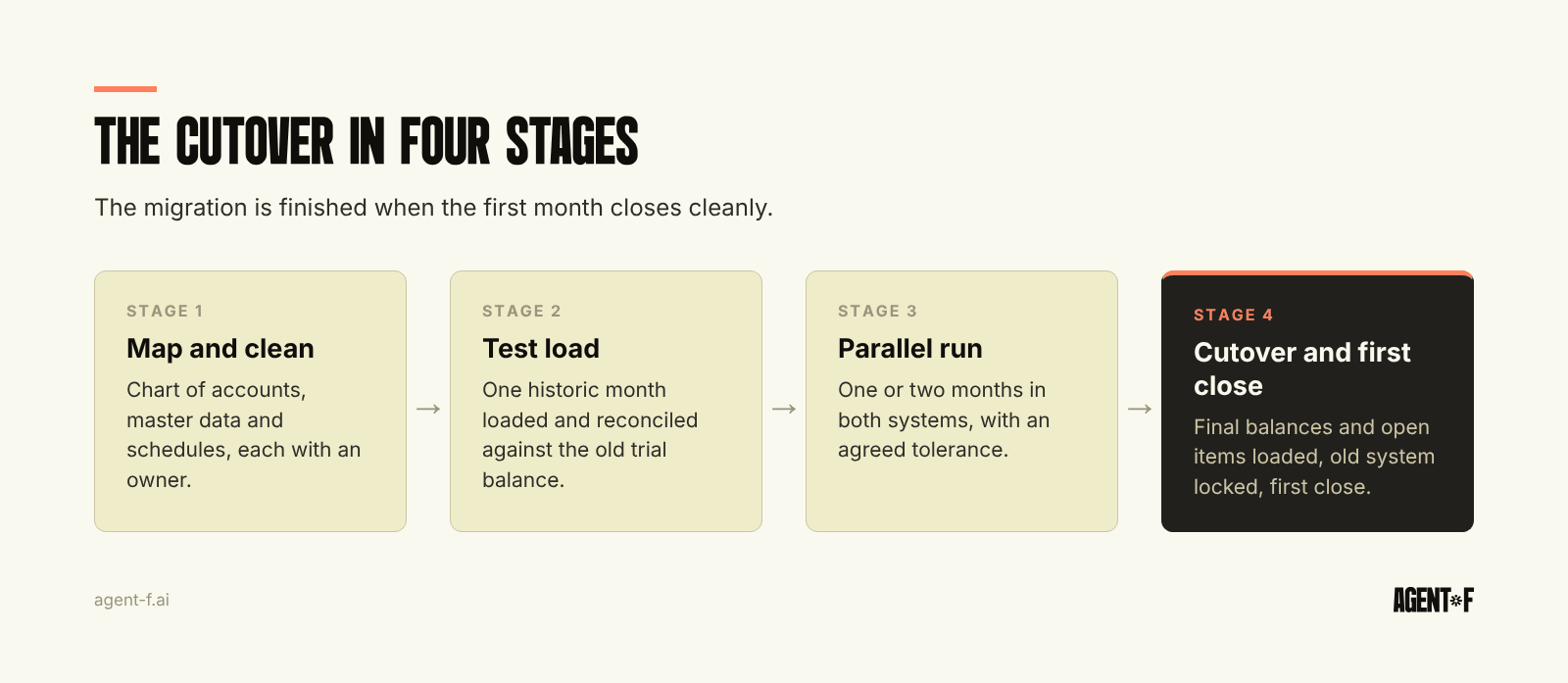
A cutover plan usually runs in four stages:
- Map and clean. Chart of accounts, master data and schedules, with owners and sign-off.
- Test load. Load one historic month into the new system and reconcile it against the old trial balance.
- Parallel run. Run one or two months in both systems, or at least book the same transactions in the new one and compare results. Agree in advance what difference is acceptable.
- Cutover and first close. Load final balances and open items, lock the old system for bookings, and close the first month in the new system with the usual month-end close checklist.
Avoid cutting over in the weeks before a year-end close, an audit or a funding round. The finance team is the same team in both projects.
How does Agent F help you migrate with your history intact?
Agent F's ERP Factory configures the system to your company rather than to an industry template. The target structure is SKR04 or your own adaptive chart of accounts. Whichever you choose, have one person on your side review and approve the mapping from the old accounts before anything is loaded.
Clean the master data before the load as well: merge duplicate customers and suppliers, fill in missing VAT IDs and align payment terms. Reconcile opening balances and open items against the old trial balance before go-live, so differences are listed rather than left for the first close. Once you are live, reconciliation is AI-assisted: each suggestion carries a confidence score, a person approves it, and every change is in the immutable audit trail. The DATEV connection keeps your tax advisor working from the same bookings.
Implementation typically takes 4 to 10 weeks, depending on modules and entities, compared with 12 to 18 months common for legacy ERP. The free onboarding period, typically three months, runs in parallel with your current system, and the subscription starts once the new setup is stable.
Before you start, pick a cutover date, agree with your tax advisor how history stays accessible, and nominate an owner for the account mapping and the master data. Then test one month end to end. More on sequencing in ERP implementation.
Learn how Agent F works, or see it on your own data at agent-f.ai/demo.
This article is for general information only and does not constitute tax or legal advice. Parts of it were generated with AI. Please consult your tax advisor or legal counsel before acting on it, and feel free to reach out at team@agent-f.com with any questions or for support.