Updated
Journal entry approval workflow: controls at the ledger, not in email

A journal entry approval workflow makes sure that manual bookings, such as accruals, corrections and reclassifications, are checked by a second person before they are posted. The control works only if it sits in the ledger itself: the entry is a draft until an authorised approver releases it, the preparer cannot approve their own entry, and every step is logged with name and time.
Most finance teams do have a four-eyes rule for manual entries. In practice it often lives in email or chat, where it cannot be enforced and is hard to prove. This guide explains which entries need approval, what German bookkeeping rules expect, and how to move the control into the system where the booking happens.
What is a journal entry approval workflow?
A journal entry is any booking made directly in the general ledger rather than generated by a sub-process such as invoicing, payables or payroll. An approval workflow puts a gate between preparing it and posting it.
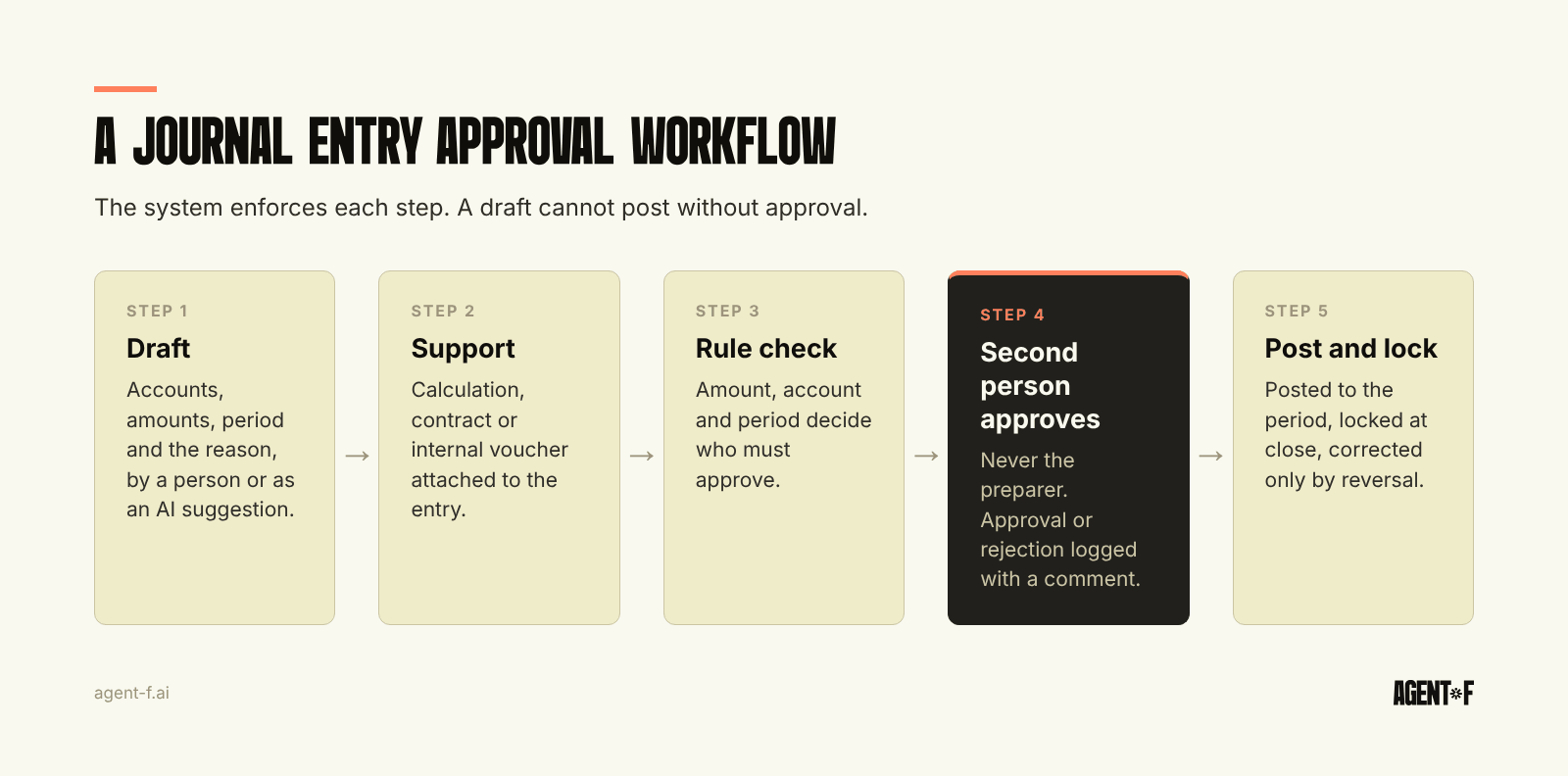
A complete workflow has five steps:
- Draft. The preparer creates the entry: accounts, amounts, period, cost centre and a description of why.
- Support. A document is attached: a calculation, a contract, an email from the tax advisor, or an internal voucher if there is no external one.
- Rule check. The system decides who must approve, based on amount, account, period and preparer.
- Approval. A second person reviews and approves or rejects, with a comment.
- Posting and lock. The entry is posted, becomes part of the period and is locked when the period closes.
The steps are simple. What matters is that the system enforces them, so a draft cannot be posted without an approval and a posted entry cannot be quietly changed.
Which journal entries need approval?
Not every booking needs a second person. Entries generated from a supplier invoice that has already passed its own approval, or from a matched bank transaction, carry their control with them. Approving them again adds work without adding safety.
Manual entries are different, because they bypass the controls of the sub-processes. These usually need approval:
- Accruals and deferrals at month-end, which are estimates by nature. Our guide to accruals at month-end covers how to calculate them.
- Corrections and reclassifications, which change numbers that someone has already reported.
- Entries to sensitive accounts: revenue, bank and cash, equity, intercompany and provisions.
- Entries above a threshold that fits the size of your company.
- Entries to a closed or nearly closed period, and entries made after the BWA (the monthly management report from your tax advisor) has gone out.
- Entries prepared by a new user, an external party or an automated process.
A small team does not need a long list. Three rules, by amount, by account and by period, cover most of the risk.
What do German bookkeeping rules expect?
German law does not use the term "journal entry approval", but the rules point clearly in its direction.
Under § 239 (3) HGB and § 146 (4) of the German Fiscal Code (AO), a booking must not be changed in a way that makes its original content unrecognisable. Corrections are made by a new, visible correcting entry, not by editing the old one. The GoBD (German digital bookkeeping rules) add detail. Every booking needs a supporting document (voucher principle, Rz. 30 and 61), and where no external document exists, an internal voucher must be created. Entries must be locked (Festschreibung) so that later changes are only possible with a log (Rz. 85).
The GoBD also require an internal control system (Rz. 100). Examples named there include access and authorisation controls and segregation of duties, and the controls have to be set up, applied and logged. The description of these controls belongs in your procedural documentation (Verfahrensdokumentation). A journal entry approval in the ledger is one of the most direct ways to show that segregation of duties works in practice, which helps when the tax office or an auditor asks. We cover that situation in preparing for a tax audit.
Why does approval by email fail?
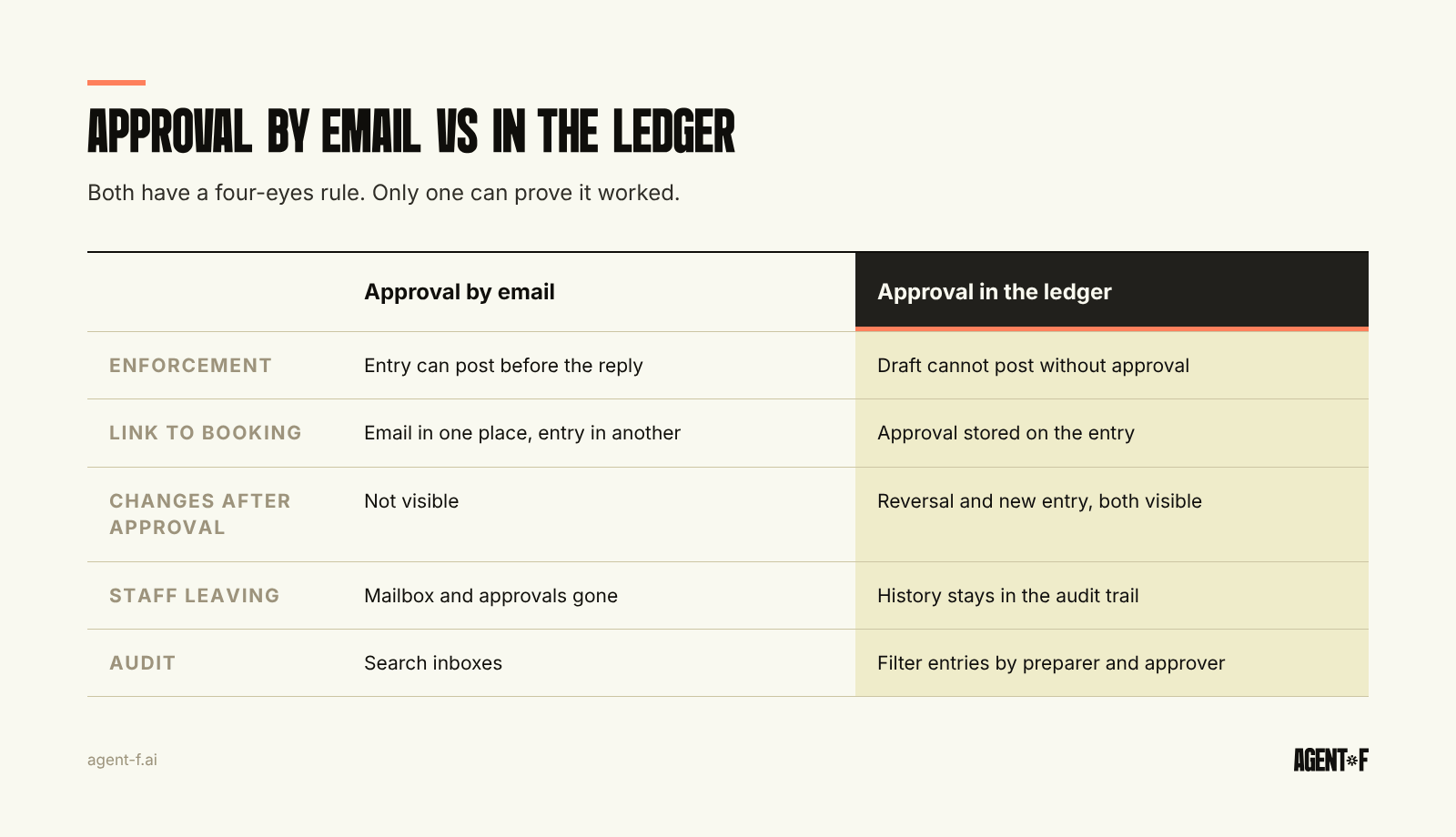
Approval by email has three weaknesses, and all three show up in an audit.
It cannot be enforced. The preparer can post the entry before the reply arrives, or without asking at all. Nothing in the ledger stops them.
It is detached from the booking. The approval sits in an inbox, the entry sits in the ledger. Linking them later means searching for the email and hoping the amounts match. If the entry was changed after approval, nobody can tell.
It does not survive people leaving. When the approver leaves the company, their mailbox goes with them. The approval for an accrual from two years ago is gone.
There is also a practical cost. Approvals by email arrive in the last days of the close, when the approver is busy. Entries wait, the close slips, and the month-end close checklist stalls on a step nobody can see.
How should you set up approval rules?
Start with a few rules that the system can enforce, then add more only when you see a real gap.
- Preparer and approver are different people. This is the core of the four-eyes principle and should have no exceptions, including for the head of finance.
- Thresholds by amount. Small entries to ordinary accounts might need one approver, large ones the head of finance or the managing director.
- Account-based rules. Revenue, bank, equity and intercompany entries always need approval, regardless of amount.
- Period rules. Once a period is locked, nobody posts into it. Corrections go into the open period, with a reference to the original entry.
- Reversals instead of edits. A wrong entry is reversed and booked again, so both versions stay visible.
An approval is only as good as the review behind it. The approver should check four things: that the supporting document actually supports the amount, that the accounts and cost centre are right, that the period is right, and that the entry does not duplicate one already posted. A click without that check is a signature, not a control. Ask approvers to add a short comment on anything above the threshold, so the reasoning is still there when someone asks a year later.
Write the rules down in one page of your procedural documentation. Review them once a year and after any change in the team.
How does Agent F enforce approval at the ledger?
In Agent F, approval is part of the general ledger, not a separate tool.
At month-end, Agent F prepares entries itself, such as accrual suggestions, depreciation and prepayment schedules. Each one is a suggestion with a confidence score, and a person approves it before it counts. AI never posts on its own. You define the approval workflows for your team, and every step is recorded in the immutable audit trail. We describe the wider principle in AI agents for finance.
The audit trail shows who prepared, who approved and when, so the evidence for segregation of duties sits next to the booking rather than in a mailbox. The period lock prevents bookings into closed months. The approved entries then reach your tax advisor (Steuerberater) through the DATEV connection.
To start, list last quarter's manual entries and mark which ones had a documented approval. Check how many were prepared and posted by the same person. Then write down three approval rules, by amount, account and period, and see whether your current system can enforce them. If it cannot, the control exists on paper only.
Learn how Agent F works, or see it on your own month-end entries at agent-f.ai/demo.
This article is for general information only and does not constitute tax or legal advice. Parts of it were generated with AI. Please consult your tax advisor or legal counsel before acting on it, and feel free to reach out at team@agent-f.com with any questions or for support.