Updated
Shop ERP integration: orders, stock and payouts in one flow
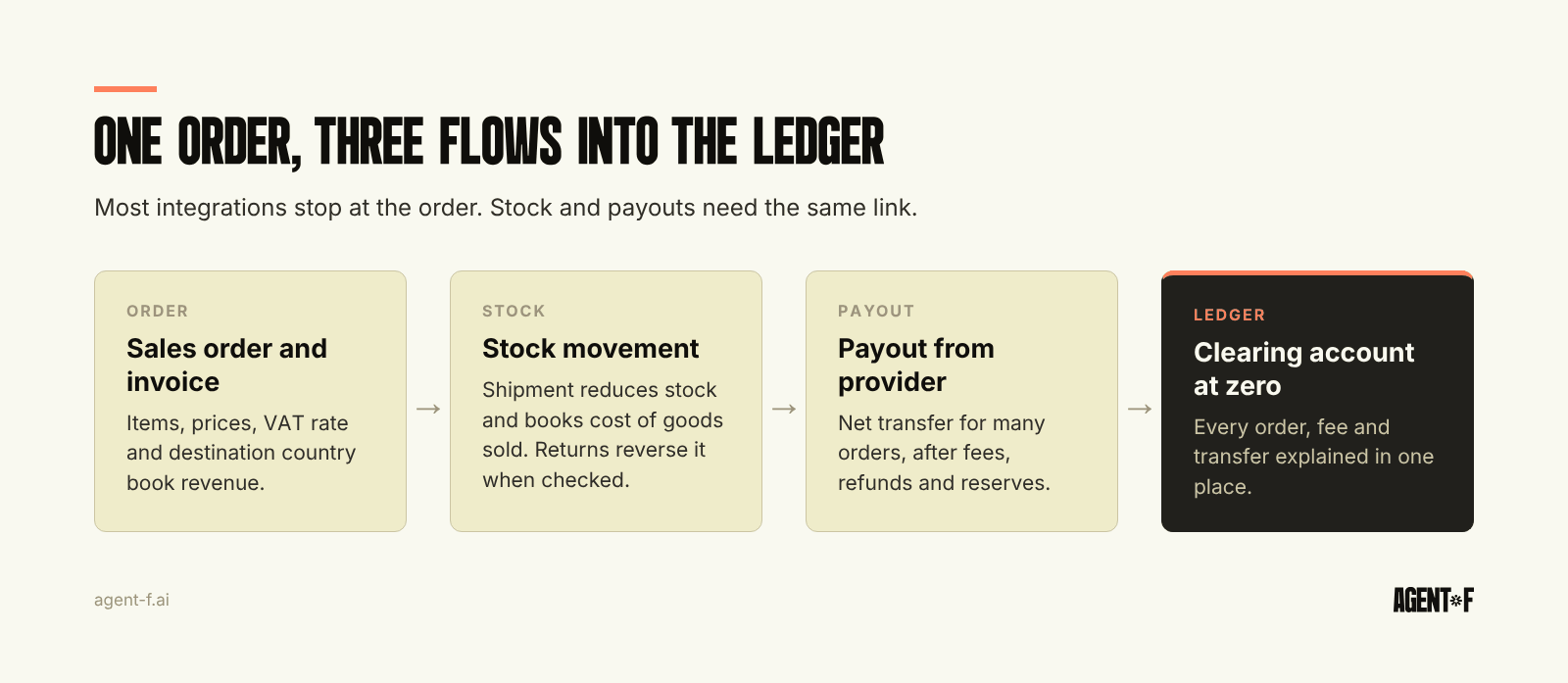
A shop ERP integration has to carry three flows, not one: the order, the stock movement behind it and the money that arrives days later as a payout. Most connections stop at the order. Stock is then corrected by hand and payouts are booked as one net amount, so revenue, fees and refunds never reconcile. A working integration links all three to the same order in the general ledger.
For D2C hardware and FoodTech brands selling through their own shop and one or two marketplaces in the EU, the order sync is rarely the problem. The trouble starts afterwards, in the warehouse and in the bank account, and that is where this guide spends its time.
What does a shop ERP integration actually have to carry?
Think of every order as the start of three separate records that must end up in the same place.
- The order itself. Customer, items, prices, discounts, shipping, VAT rate and the country it ships to. This creates the invoice or receipt and the revenue booking.
- The stock movement. The goods leave a warehouse, your own or a fulfilment partner's. Stock falls, and in the books the cost of goods sold rises. Returns reverse part of it, but only once the item is back and checked.
- The payout. The shop, the payment provider or the marketplace collects the money, deducts its fees and transfers a net amount, usually for many orders at once and on its own schedule.
Point solutions tend to handle one of the three well. The shop connector writes orders, the warehouse tool counts stock, and the payout lands in the bank as a single line that someone matches by hand at month-end. Each part works, and the gaps between them are where the finance team spends its week.
Why do stock levels drift between the shop, the marketplace and the warehouse?
Stock drifts because each channel keeps its own number and updates it at its own pace. The shop reserves stock when an order is placed. The marketplace may hold its own stock in its own warehouses. The fulfilment partner reports what it physically shipped, sometimes once a day. If these numbers are synchronised in one direction only, or in batches, you sell items you no longer have, or you hide items you do have.
Bundles and sets make it worse. A starter kit in the shop may be three separate items in the warehouse, and a FoodTech brand may sell a single product in three pack sizes from one production batch. If the integration does not break the bundle into its components, stock is wrong the moment the first kit sells.
Returns are the third source. A refund in the shop does not mean the item is back on the shelf. The goods may be in transit, damaged or written off, and each case needs a different stock and accounting entry. The fix is one stock record that every channel reads from, with movements booked when they happen, not when someone reconciles. We cover the counting side in inventory management.
Why does the marketplace payout never match the revenue?
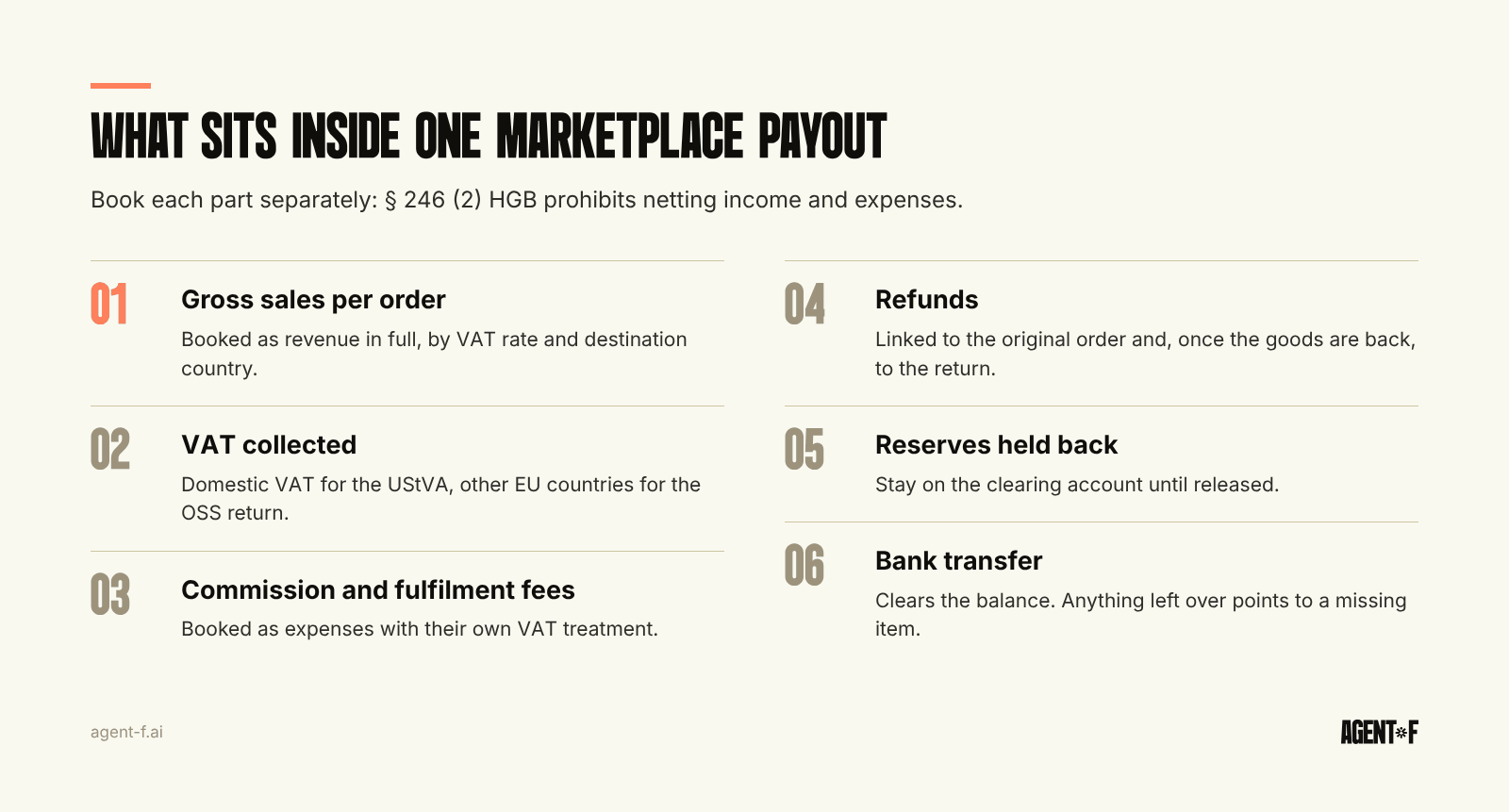
A payout is a net figure. The provider has already taken its sales commission, fulfilment fees, advertising costs and refunds, and may hold back a reserve. What reaches the bank is the remainder, often covering hundreds of orders and a period that does not match your calendar month.
Booking that net amount as revenue is the most common shortcut, and under German commercial law (HGB) it is not allowed. § 246 (2) HGB prohibits offsetting income against expenses. Revenue has to be booked in full, and the fees as a separate expense with their own VAT treatment. Your tax advisor (Steuerberater) needs both, and so does anyone looking at margins.
The clean approach is a clearing account for each payment provider or marketplace:
- Each order books gross revenue and VAT against the clearing account.
- Each fee, refund and reserve in the settlement report is booked against the same account.
- The bank transfer clears the balance.
If the account goes to zero, everything is explained. If it does not, the remainder points you to the missing order or the unexplained fee. This is the same logic as any payment reconciliation, with one difference: a single bank line hides many transactions, so matching has to happen at order level, not at payout level. Once fees sit per order, you can also see the real contribution margin by product or channel, which a net payout hides.
What changes when you sell into other EU countries?
Selling across the EU adds VAT per country to every order. Since 1 July 2021, once your sales to consumers in other EU countries exceed 10,000 euros in total across the EU, you charge the VAT of the customer's country, not German VAT. Most companies then report these sales through the One-Stop-Shop (OSS) with a quarterly return, instead of registering in each country.
For the integration, this means each order has to carry the destination country and the correct local rate, and the ledger needs to report sales per country. A shop that applies German VAT to everything, with the error corrected later in a spreadsheet, creates work every quarter.
Marketplace warehouses abroad are a separate question. If your goods are stored in another EU country to deliver faster, moving them there counts as an intra-community transfer, and the OSS does not cover it. You usually need a local VAT registration in that country. That makes stock location a tax question as well as a logistics one, and it is one more reason the stock record and the ledger should be the same system. Check your setup with your tax advisor before you activate warehouses in a new country.
What does your tax advisor need from the shop?
Most tax advisors do not want every shop order as a separate booking, and they do not want a single monthly total either. They want revenue split by VAT rate and country, fees and refunds booked separately, the clearing accounts reconciled, and a trail from each booking back to the original order. That trail matters under GoBD (German digital bookkeeping rules), which require every booking to be traceable to its source.
In practice that means daily or per-payout summaries with order-level detail behind them, delivered in a form the tax advisor can import. If your monthly handover still involves exporting a shop report, reformatting it in a spreadsheet and sending it by email, the DATEV export is the place to fix it.
How does Agent F connect the shop, the stock and the payouts?
In Agent F, the shop, the warehouse and the ledger share one data model, so an order is one record with three consequences rather than three records that need matching.
A shop order, from Shopify for example, creates the sales order and reduces stock in the right warehouse. Revenue and VAT are booked in the same ledger, and the figures feed the advance VAT return (UStVA) preparation. Shipments and returns move stock when they happen, and stock is valued across locations.
When money arrives from a payment provider such as Stripe, PayPal or Klarna, AI-assisted reconciliation suggests how it matches your open invoices. Each suggestion carries a confidence score. Clear cases are matched for a person to confirm, and anomaly detection flags anything unusual for review. Nothing is booked without approval, and every step is recorded in the immutable audit trail. Categorisation learns from your corrections, and reconciliation accuracy typically reaches above 90 percent by the third month. Bookings flow into the DATEV export without being typed again.
If you want to test your current setup, start with three checks. Pick last month's largest payout and try to explain it to the cent from the books. Compare stock in your shop with stock in the warehouse for your five best-selling items. Ask your tax advisor how much time they spend correcting e-commerce bookings each month. If any of the three takes longer than an hour, the integration covers the order and not the rest.
Learn how Agent F works, or see it on your own orders and payouts at agent-f.ai/demo.
This article is for general information only and does not constitute tax or legal advice. Parts of it were generated with AI. Please consult your tax advisor or legal counsel before acting on it, and feel free to reach out at team@agent-f.com with any questions or for support.