Updated
Chart of accounts: setting up SKR03 or SKR04 so your reports mean something
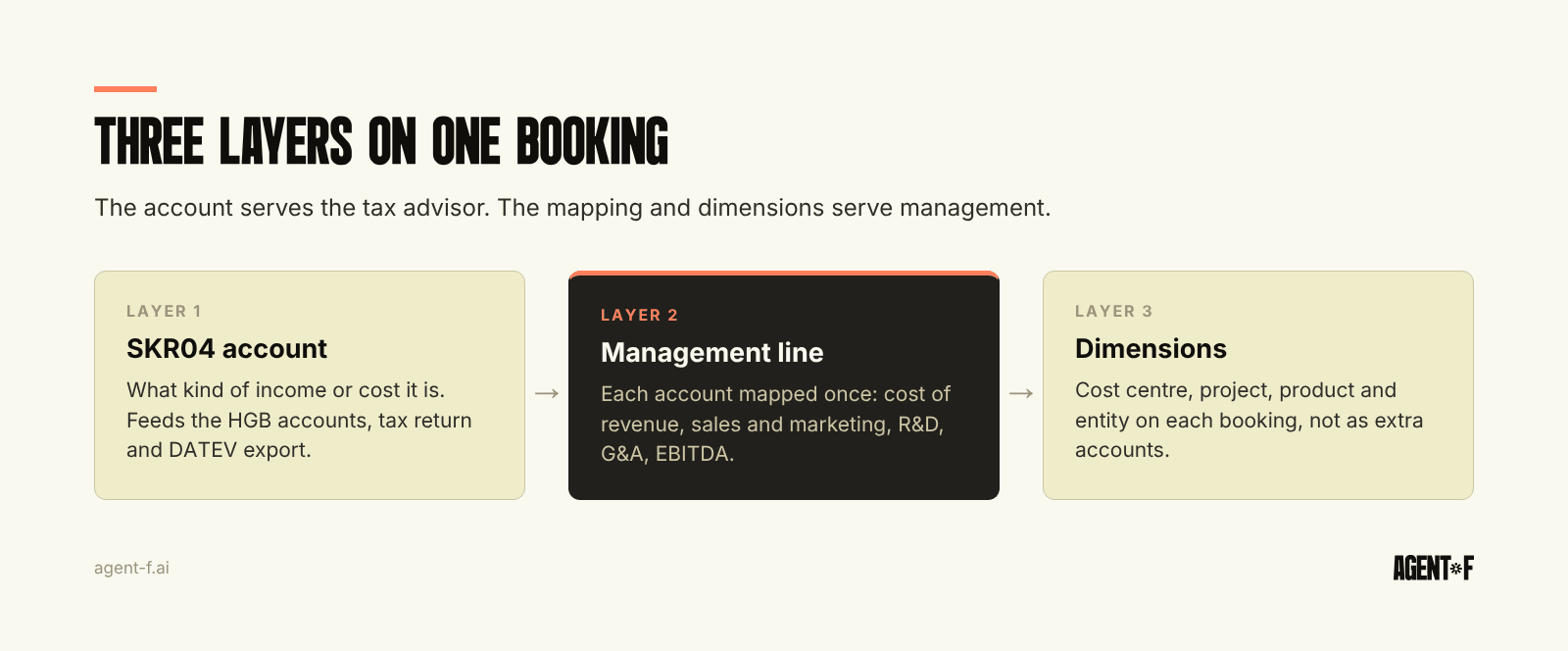
A chart of accounts is the list of accounts every booking goes to. In Germany, most companies start from one of two DATEV standards: SKR03, ordered along business processes, or SKR04, ordered like the balance sheet and income statement. Either works for the tax return. Reports become useful when you add a second layer: a mapping from each account to a management line, and dimensions such as cost centre and project on each booking.
Most chart of accounts decisions are made once, by the tax advisor (Steuerberater), in the week the company is founded. Years later, the finance team discovers that the books are correct and the reports say very little. This guide is about closing that gap without breaking what the tax advisor needs.
What does the choice of SKR03 or SKR04 actually decide?
A standard chart (Standardkontenrahmen, SKR) fixes the numbering logic of your accounts and which numbers carry which meaning. DATEV maintains both charts and updates them regularly. Each account is linked to a position in the balance sheet and P&L under the German Commercial Code (HGB), and to the tax return. Many accounts also carry functions, for example automatic VAT calculation on revenue and expense accounts.
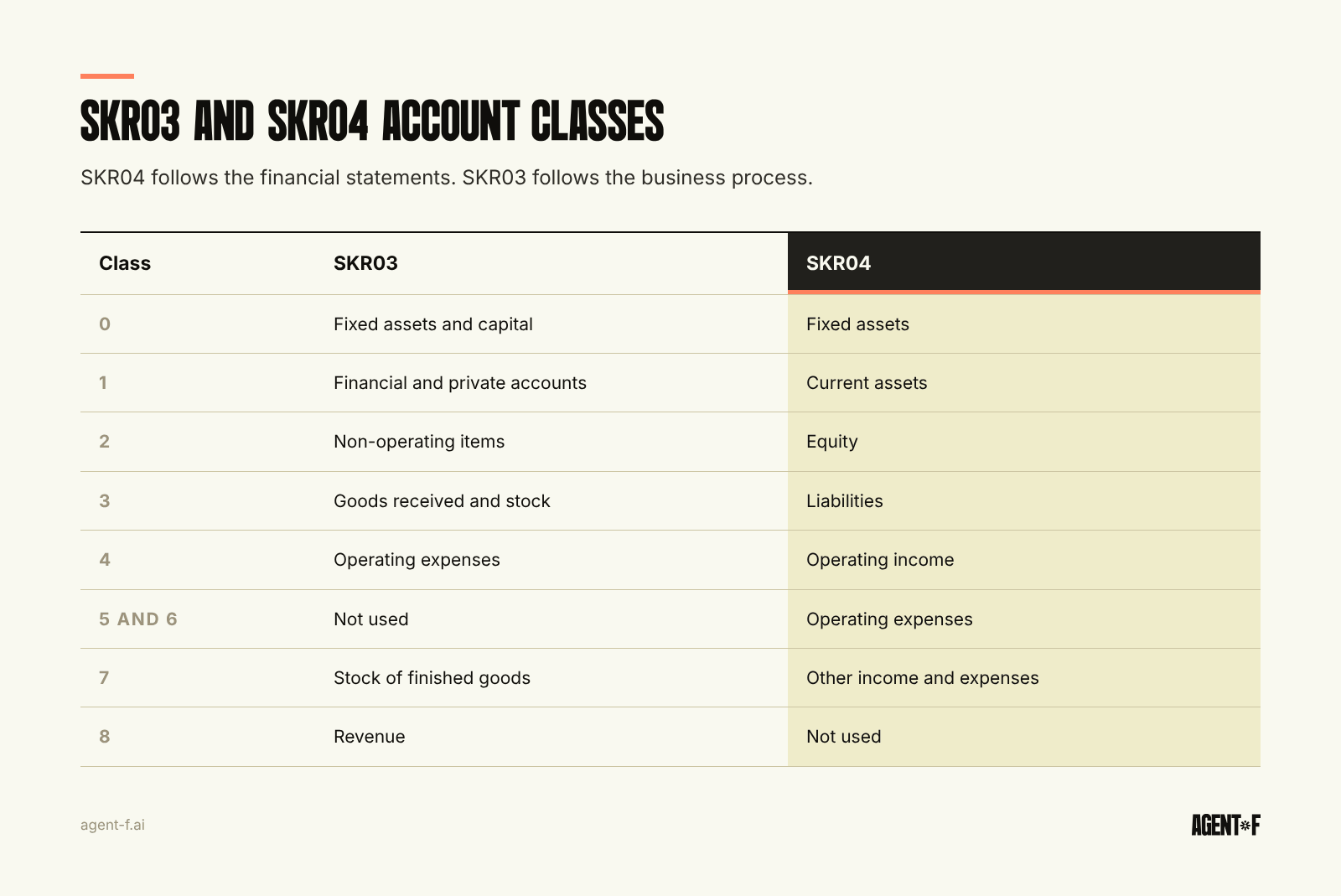
The two charts differ in their order. In SKR04, the account classes follow the financial statements: class 0 for fixed assets, 1 for current assets, 2 for equity, 3 for liabilities, 4 for operating income, 5 and 6 for operating expenses, 7 for other income and expenses. In SKR03, classes follow the flow of the business: 0 for fixed assets and capital, 1 for financial and private accounts, 2 for non-operating items, 3 for goods received, 4 for operating expenses, 8 for revenue. Revenue at 19 percent VAT is typically 4400 in SKR04 and 8400 in SKR03.
What the choice does not decide is how useful your reports will be. Both charts are designed for statutory accounts and tax, not for running the company.
SKR03 or SKR04: which one should you choose?
For a GmbH starting today, SKR04 is usually the more natural choice. The account order mirrors the annual accounts, which makes the trial balance easier to read for anyone who thinks in balance sheet and P&L terms, including investors and auditors. SKR03 is still widespread, particularly among smaller companies and in trade, and many tax advisors have worked with it for decades.
Three practical points matter more than the theory:
- Your tax advisor's routine. A chart your advisor knows well will be booked faster and with fewer errors. Ask before deciding.
- Comparability. Switching from SKR03 to SKR04 later is possible, but every account has to be mapped to its counterpart, and prior-year comparisons need the same mapping. If you switch, do it at the start of a financial year and agree the mapping in writing.
- Group structure. If you have several entities, use the same chart in all of them. Consolidation and intercompany matching are much simpler when the same account number means the same thing everywhere.
Agent F uses SKR04 as its standard, for the reasons above. The rest of this guide applies to either chart.
Why does a standard chart produce reports nobody uses?
Because the standard groups costs the way the tax return needs them. Three patterns show up in almost every growing company.
The catch-all account. A large share of costs ends up in a few broad expense accounts: other operating expenses, IT costs, consulting. Software subscriptions for the product, the sales team's tools and the office Wi-Fi sit side by side.
Costs by type, never by function. Salaries are booked as one block of personnel costs. The P&L cannot show what sales, product or administration cost, which is exactly what a board or an investor asks first.
Revenue by VAT key, not by business line. Revenue accounts are split by tax treatment: domestic 19 percent, 7 percent, EU reverse charge, export. That is right for the advance VAT return and says nothing about which product or customer group grew.
The BWA (the monthly management report from your tax advisor) inherits all three, because it is built on the same account groups. Why it still arrives late and what it can show is covered in reading the BWA.
How do you extend SKR04 without breaking the DATEV export?
Some extension is useful. The rule is to extend within the standard, not around it.
- Add accounts inside the intended ranges. SKR04 leaves room within each group for individual accounts. A new account for cloud hosting belongs next to the other IT costs, with the same balance sheet and tax mapping.
- Do not touch the account functions. Accounts with automatic VAT or special tax treatment should be used as defined. Copying them without their function produces VAT errors that only surface in the advance VAT return.
- Name accounts for what they contain. "Software, product infrastructure" is better than "Other IT 2".
- Keep the business view out of the account number. An account per customer, per project or per cost centre multiplies the chart and still does not give you a usable report. These belong in dimensions, as explained in general ledger structure.
- Document every change. The German bookkeeping rules (GoBD) expect a description of the accounting procedure (Verfahrensdokumentation). The chart and its changes are part of it.
Test any extension against the handover. Every account you add has to reach your tax advisor in the DATEV export with a clear meaning, or it will be remapped on their side and your reports and theirs will drift apart.
How do you map accounts to a management view?
The management view is a separate structure on top of the chart. Each account is assigned to exactly one management line, and the lines are arranged the way you want to read the business. A typical structure for a growing company:
- Revenue, split by business line using dimensions
- Cost of goods sold or cost of revenue, such as hosting, payment fees and direct material
- Gross margin
- Operating costs by function: sales and marketing, research and development, general and administration, with personnel costs allocated through cost centres
- EBITDA, then depreciation, interest and tax
Three checks keep the mapping honest. Every account is mapped once, with nothing left over. The management P&L reconciles to the HGB P&L in total, so the two views tell the same story with different groupings. And the mapping is maintained in one place, not in each spreadsheet that uses it. Once this holds, a budget vs actual comparison and a board report can be built on the same lines, as described in management reporting without Excel.
How does Agent F map bookings to SKR04 and your reporting at the same time?
Agent F starts from SKR04 and adapts the chart of accounts to your company during setup by the ERP Factory, rather than copying an industry template. Alongside the chart, your management structure is defined once: management lines, cost centres and other dimensions. Every booking then carries both, so the same transaction appears in the HGB P&L, in the BWA and in your management P&L without a separate mapping step in Excel.
When an invoice or bank transaction arrives, Agent F suggests the account and the dimensions from your booking history, with a confidence score. A person approves or corrects, the categorisation learns from the correction, and every change is recorded in the audit trail. The tax advisor receives SKR04 bookings in the DATEV export as before.
To start, export your trial balance and check three things: how much of your cost base sits in catch-all accounts, whether personnel costs can be split by function, and whether revenue can be split by business line. Then write the management structure you want on one page and map each account to it once. The accounts that do not fit show where the chart needs work.
Learn how Agent F works, or see it on your own chart of accounts at agent-f.ai/demo.
This article is for general information only and does not constitute tax or legal advice. Parts of it were generated with AI. Please consult your tax advisor or legal counsel before acting on it, and feel free to reach out at team@agent-f.com with any questions or for support.