Updated
Financial close software: what to test before you buy
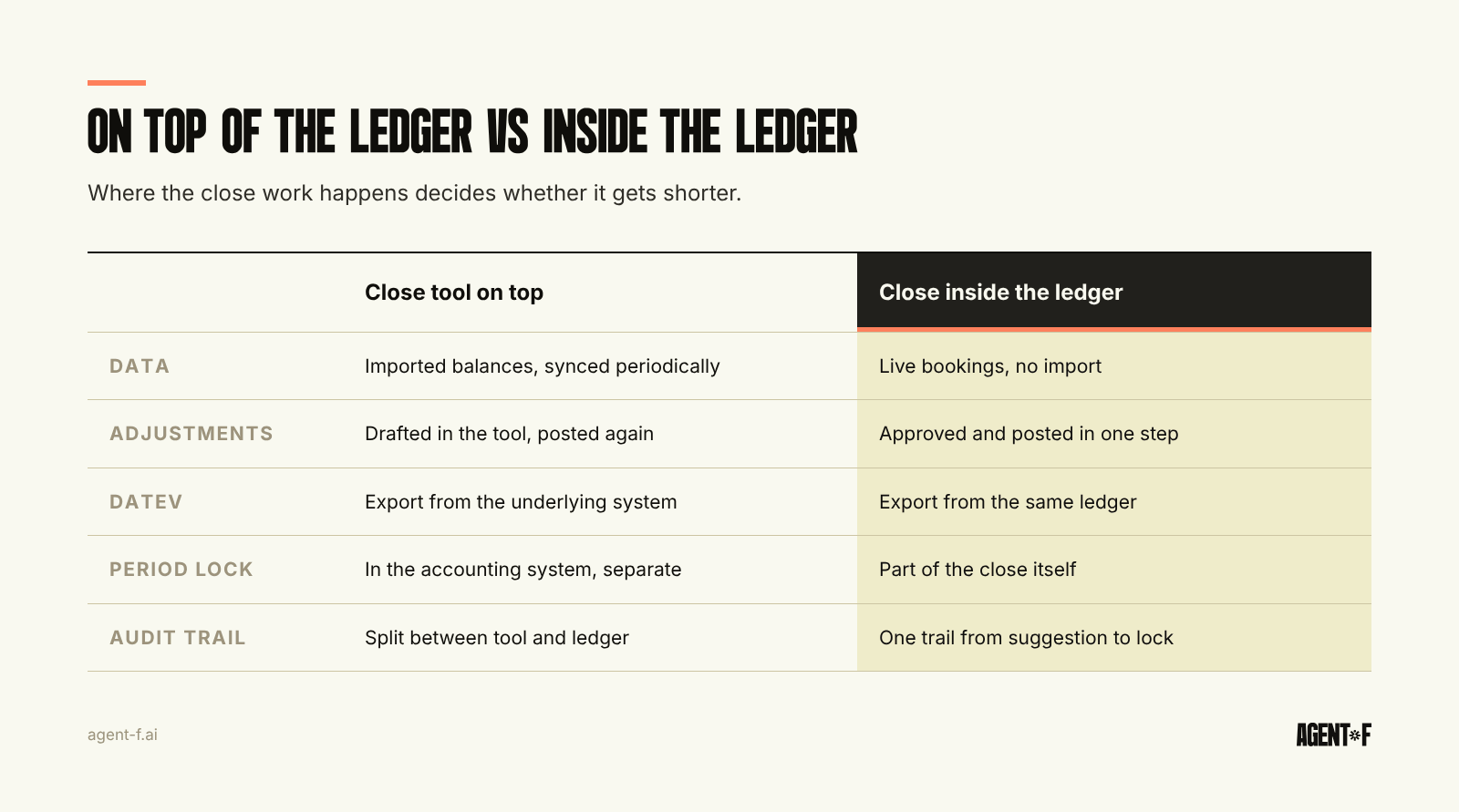
Financial close software comes in two kinds: tools that sit on top of your ledger and organise the close, and systems where the close happens inside the ledger itself. Before you buy, test one thing first: does the software work on your actual bookings, or on an export of them? In Germany, also test the DATEV handover, the period lock and the audit trail on your own month.
Most buying guides compare features. Features rarely decide whether the close gets shorter. What decides it is where the work happens: if the reconciliation, the accrual and the approval happen outside the ledger, someone still has to carry the result back in. This guide gives you the tests that show the difference in a demo.
What are the two kinds of financial close software?
Close tools on top of the ledger, often sold as close management software. These are checklist and reconciliation workspaces. They import balances and transactions from your accounting system, give each close task an owner and a due date, and let reviewers sign off. Some add AI that explains variances or drafts journal entries. They help when the ledger is fine and the problem is coordination: nobody knows who is blocking the next step.
Close inside the ledger. Here the system that holds the bookings also runs the close: matching, accruals, depreciation, review and period lock. There is no import, because the data never leaves. This makes sense when the work between tools is the problem, which it usually is in a 30 to 200 person company running basic accounting tools, a few point solutions and Excel.
The German setup adds a twist. Many companies do not keep their own books at all. Their tax advisor (Steuerberater) books in DATEV, and the company sees the result as a BWA (the monthly management report from your tax advisor) weeks later. A close tool on top of that ledger works on data that is already a month old and owned by someone else. Before buying anything, decide who will own the books after the purchase. Our guide to the month-end close process with a tax advisor shows how that split usually works.
How do you find out which one you need?
Take your last close and write down where each day went. The pattern usually falls into one of three groups:
- Waiting: for receipts, for the bank statement, for someone's approval. Coordination tools help here.
- Rework: reconciling the same clearing account twice, re-entering adjustments from a spreadsheet, fixing an export. Only moving the work into the ledger helps here.
- Hand-off: sending the DATEV file, waiting for the tax advisor's questions, answering them, receiving the BWA. This shrinks only when the books are clean when they reach the advisor.
If most of the days are waiting, a close tool may be enough. If they are rework and hand-off, a checklist on top will make the delay visible without removing it. A plain month-end close checklist is often a cheaper first step than any software.
Which tests should you run in the demo?
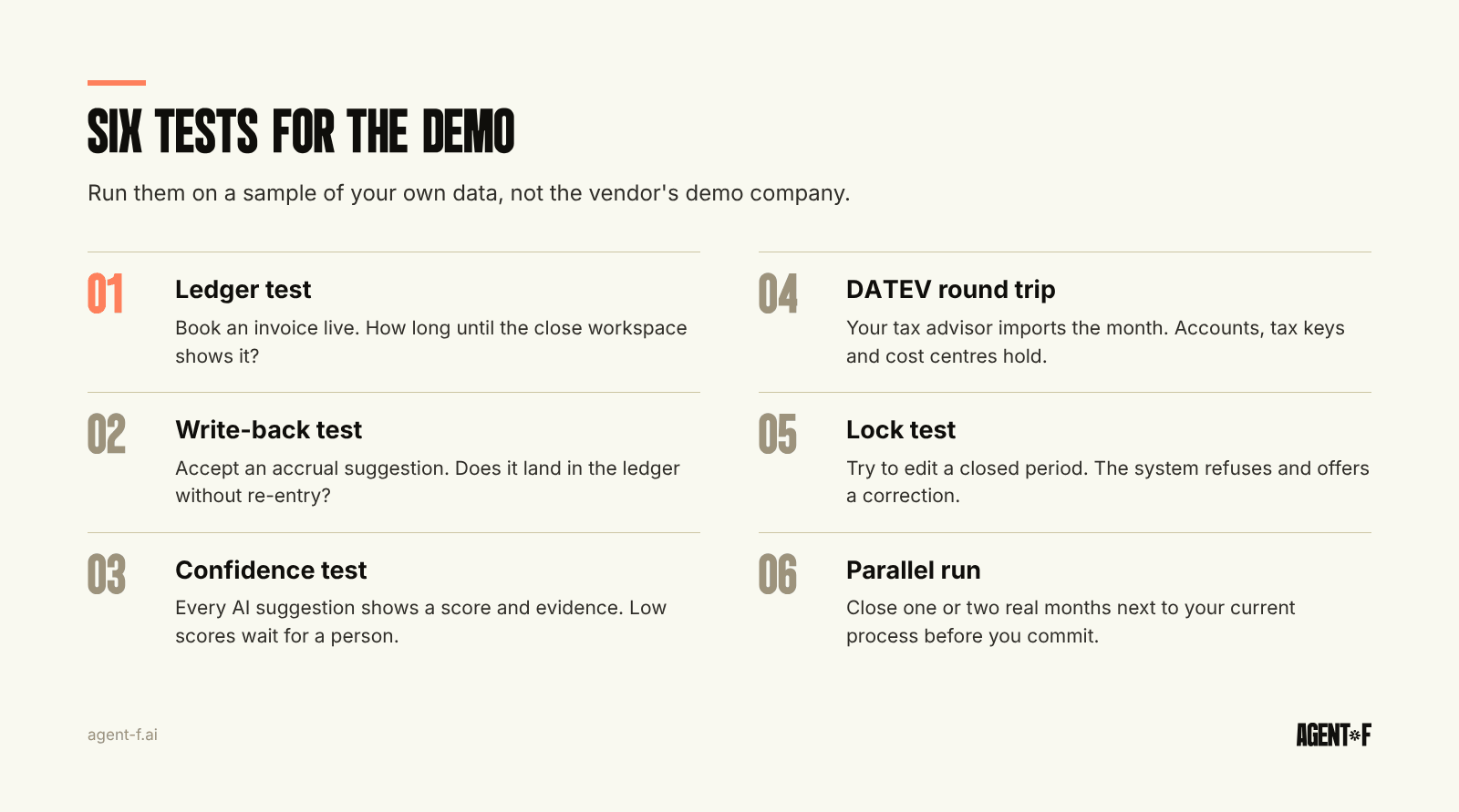
Ask the vendor to run each test on a sample of your own data, not their demo company.
- The ledger test. Book a supplier invoice during the demo. How long until it appears in the close workspace? If the answer is "after the next sync", the AI and the reconciliations are working on an export.
- The write-back test. Ask the system to propose an accrual for a missing invoice. Where does the accepted entry land? If it stays in the tool and someone must post it in the ledger, you have added a step.
- The confidence test. Look at five AI suggestions. Each should show a confidence score and the evidence used, and low-confidence items should wait for a person. A suggestion without a reason is a guess.
- The DATEV round trip. Export the month in DATEV format and ask your tax advisor to import it. Check accounts, tax keys, cost centres and document links. Our article on the DATEV export lists what must be in it.
- The lock test. Close the period, then try to change an entry in it. Under the GoBD (German digital bookkeeping rules), bookings must be locked (Festschreibung) and corrections must be new, visible entries. The system should refuse the edit and offer a correction in an open period.
- The parallel run. Ask whether you can run one or two real months next to your current process before you commit. Comparing two closes on the same month tells you more than any reference call.
The ledger test and the write-back test are the ones most demos avoid. For the AI side, the broader evaluation is in AI-native ERP vs AI added on.
What does a German close need that a US-built tool may miss?
The close calendar in Germany is anchored on tax deadlines, not only on board meetings. The advance VAT return (UStVA) is due by the tenth day after the period. With a permanent extension (Dauerfristverlängerung) it moves one month later, and monthly filers pay a special prepayment of one eleventh of the prior year's advance payments for that extension. Whatever software you choose must have the month's VAT figures ready before that date and lock the period after filing.
Beyond that, check four things. The chart of accounts should run on SKR04 or SKR03 without a mapping table in between. HGB (German Commercial Code) and, if you report to investors that way, IFRS should be supported from the same bookings. The audit trail should be readable by a person, not only a technical log, because the tax office and the auditor will ask how automated entries came about. And the procedure documentation (Verfahrensdokumentation) required by the GoBD should be possible to write from what the system actually does.
What objections come up, and how do you answer them?
"We do not have time for an implementation." Ask for a realistic timeline per module and who does the work. A close inside the ledger means moving bookkeeping, so it is a bigger decision than adding a tool. It should still take weeks, not a year.
"Our tax advisor works in DATEV." That does not change. The question is whether the advisor receives clean data to review or raw documents to book. Most advisors prefer the first.
"Where is our data?" Ask where the data is hosted, how it is encrypted, how often it is backed up and which certifications exist or are in progress. For a German company, hosting in Germany or the EU and GDPR compliance are the baseline.
How does Agent F run the close inside the ledger?
Agent F is an AI-native ERP in which the close happens on the general ledger itself. Bank transactions are matched as they arrive, and the system suggests accruals, depreciation and prepayment schedules, each with a confidence score. A person reviews and approves. Nothing is posted without approval, and every step is in an immutable audit trail. After review, Agent F prepares the UStVA figures, locks the period and produces the DATEV export for your tax advisor.
Because there is no export between ledger and close, the demo tests above run on live data. Companies typically move from a 5 to 10 day close to 1 to 2 days. Implementation takes 4 to 10 weeks rather than the 12 to 18 months common for legacy ERP. A free onboarding period, typically three months, runs in parallel with your current process, and the subscription starts once the close is stable. Data is hosted in Germany with AES-256 encryption and daily backups. ISO 27001 certification is in progress. If you want to move work into the month, read continuous close next.
Before your next demo, write down where the days of your last close went, prepare one month of real data, and send the six tests to the vendor in advance. Ask your tax advisor to join for the DATEV round trip.
Learn how Agent F works, or see it on your own month-end at agent-f.ai/demo.
This article is for general information only and does not constitute tax or legal advice. Parts of it were generated with AI. Please consult your tax advisor or legal counsel before acting on it, and feel free to reach out at team@agent-f.com with any questions or for support.